6 Best Office Chairs That Recline (October 2026)
The best reclining office chairs include the GABRYLLY Chair with Footrest for workday posture changes, the Humergo Reclining Chair with Footrest for precise break angles, and the amseatec Reclining Big and Tall Chair for executive-style home offices.
On this page (8 sections)
- Which office chairs that recline suit different needs?
- What makes these reclining office chairs different?
- How should you choose an office chair that reclines?
- How much space does a reclining office chair need?
- How do you set up a reclining chair for work and breaks?
- What mistakes make a reclining chair less useful?
- How should you care for the recline mechanism and upholstery?
- Which reclining office chair should you pick?
The GABRYLLY Chair with Footrest is the best office chair that reclines for buyers who want adjustable desk support and clear work-to-break settings. Humergo suits finer angle choices, while SITPRO puts deeper reclining first.
Start with how the chair fits when you're working, then judge its break features. A footrest and a large recline angle won't help if the seat presses behind your knees or the arms keep you away from the keyboard.
For broader seat and back support options, see the best ergonomic office chairs for a home office. If your current chair has unused controls, learn how to adjust an office chair before replacing it.
Our picks at a glance
-
1

-
2
 Best for precise break angles
Humergo Reclining Chair with Footrest
7.4/10 our score
See it on Amazon -
3
 Best for executive-style home offices
amseatec Reclining Big and Tall Chair
7.3/10 our score
See it on Amazon
- 4
 Check it
Sofayonn Criss Cross Reclining Chair
Best for cross-legged sitting - 5
 Check it
CYKOV Reclining Chair with Footrest
Best for shared home workspaces - 6
 Check it
SITPRO Reclining Chair with Footrest
Best for deeper reclining breaks
Which office chairs that recline suit different needs?
Choose GABRYLLY for adjustable desk support, Humergo for precise angle locking, or amseatec for an upholstered office. Sofayonn serves cross-legged sitters, CYKOV offers adjustable support for a shared workspace, and SITPRO favors deeper breaks.
We compared recline controls, support adjustments, seating materials and footrest designs. The key buying difference is how each chair changes between working upright and leaning back.
Don't assume a lower-ranked chair is wrong for your needs. A buyer who mainly wants extra room for folded legs has a stronger reason to choose Sofayonn than someone who spends most of the day typing.
| Product | Best for | Recline | Support | Footrest | Our score |
|---|---|---|---|---|---|
| GABRYLLY Chair with Footrest | workday posture changes | 90°, 110° and 135° positions | 2-way lumbar, adjustable headrest and 3-way armrests | Retractable, extends up to 18.1 in | 8.1 |
| Humergo Reclining Chair with Footrest | precise break angles | 90° to 145°, locks at any angle | 2 cm lumbar depth adjustment and rotating headrest | Retractable and padded | 7.4 |
| amseatec Reclining Big and Tall Chair | executive-style home offices | Up to 135° | Wide backrest and lumbar support | Retractable | 7.3 |
| Sofayonn Criss Cross Reclining Chair | cross-legged sitting | Lockable reclining backrest | Height-adjustable headrest and lumbar pillow | 7.0 | |
| CYKOV Reclining Chair with Footrest | shared home workspaces | Up to 135° | 2-way lumbar and 4-way headrest | Retractable | 6.9 |
| SITPRO Reclining Chair with Footrest | deeper reclining breaks | 90° to 160°, lockable angles | Adjustable lumbar and headrest | Retractable | 6.6 |
What makes these reclining office chairs different?
The biggest differences are how the backrest locks and how the chair fits your body. Compare those features before treating maximum recline as the deciding number.
GABRYLLY: an office chair that reclines between work and breaks
GABRYLLY Chair with Footrest
- 90°, 110° and 135° lockable positions
- 2-way adjustable lumbar support
- 3-way armrests
- Retractable footrest
Choose GABRYLLY if you want distinct work and break positions with separate arm, neck and lower-back adjustments. Its all-mesh design also suits buyers who prefer airflow through the seat and back.
Pros
- Three repeatable recline settings
- Armrests adjust in three directions
- Lumbar support adjusts in height and depth
Cons
- No intermediate lock positions between the three settings
- Recommended height range is 5 ft 3 in to 6 ft
Choose GABRYLLY if you want a chair you can set up for keyboard work, then return to familiar break positions. The backrest locks at 90°, 110° and 135°, so switching tasks doesn't require finding the same angle by feel.
Its lumbar support moves vertically and in depth, while the headrest adjusts in height, angle and bracket position. The armrests move up and down, forward and back, and inward or outward, giving you several ways to bring support toward your body.
That arm adjustment matters if you alternate between typing and reading. You can position your elbows near your sides for desk work, then change the support when you move away from the keyboard.
The all-mesh design suits buyers who prefer airflow through both the seat and back. Its steel footrest extends up to 18.1 in, and GABRYLLY backs the chair with a 3-year parts warranty.
Skip it if you want to lock between its preset positions or fall outside the recommended 5 ft 3 in to 6 ft height range. GABRYLLY gives conflicting 300 lb and 400 lb capacity figures, so heavier buyers need confirmation of the exact model's limit.
Humergo: finer control for reading and relaxed calls
Humergo Reclining Chair with Footrest
- 90° to 145° recline with angle locking
- Retractable footrest
- Movable lumbar crossbar
- Linkage armrests
Humergo suits readers who want to stop between preset angles. Its linked armrests follow the recline, while a foam seat provides a different feel from an all-mesh chair.
Pros
- Backrest locks throughout its recline range
- Armrests move with the backrest
- Padded footrest and foam seat
Cons
- Linked arm movement differs from independent arm adjustment
- Conflicting 350 lb and 365 lb capacity figures
Choose Humergo if preset angles tend to feel either too upright or too laid back. Its backrest locks anywhere from 90° to 145°, allowing smaller changes for reading, watching a screen or taking a break.
The linkage armrests move with the backrest as it reclines. That design suits buyers who want the arms to follow a posture change, although it differs from independently positioning each armrest for a desk.
A movable lumbar crossbar provides 2 cm of depth adjustment. The headrest adjusts in height and rotates, so spend time setting both supports before judging the reclined position.
The mesh back pairs with a high-density polyurethane foam seat and padded retractable footrest. This combination suits someone who wants airflow behind their back but prefers sitting on a cushion rather than mesh.
Skip it if independent arm positioning is essential to your keyboard setup. Humergo also gives conflicting 350 lb and 365 lb capacity figures, which need resolving before a buyer near those limits orders.
amseatec: an upholstered chair for an executive-style office
amseatec Reclining Big and Tall Chair
- 135° recline
- Retractable footrest
- Faux leather upholstery
- Tilt lock and self-balancing tilt
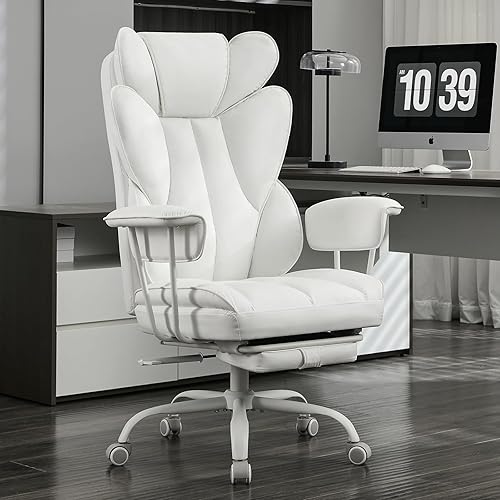
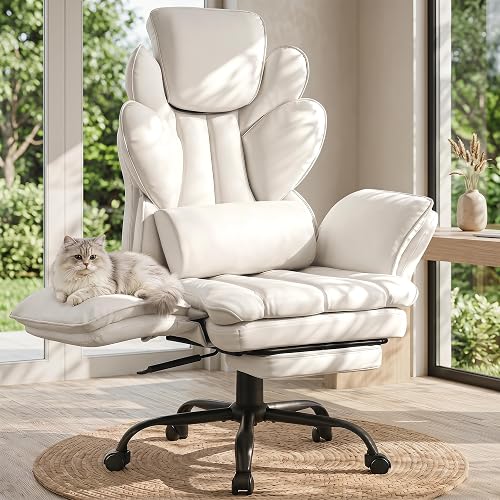
Choose amseatec for a foam-filled, upholstered chair with a wing-back shape. It suits an office where a covered back and executive appearance matter more than mesh airflow.
Pros
- Faux leather upholstery and foam filling
- Weight-sensing self-balancing tilt system
- Height and backrest adjustment
Cons
- 54 lb chair can be awkward to move between rooms
- 300 lb capacity despite its big-and-tall name
Choose amseatec if you want a covered, foam-filled chair rather than a mesh design. Its faux leather upholstery and wing-back shape suit a home office where the chair also serves as a place to read or unwind.
The back reclines up to 135°, with a retractable footrest for leg support. Height and backrest adjustment help you establish a working position before using the lounge features.
The chair includes tilt lock and a weight-sensing self-balancing system. Treat tilt and backrest recline as separate controls to learn during setup, rather than assuming they create the same movement.
This is a 54 lb chair with a 300 lb capacity. The big-and-tall name doesn't replace a fit check, especially if you need generous seat depth or a particular arm spacing.
Skip it if your priority is airflow through the back or the arm adjustment offered by GABRYLLY. It's also less convenient for frequent moves between floors, even though its swivel design suits normal movement around a desk.
Sofayonn: extra lateral room for changing sitting positions
Sofayonn Criss Cross Reclining Chair
- Flip-flat armrests
- Reclining back and footrest
- Adjustable headrest
- Vibrating lumbar pillow
Sofayonn suits buyers who want room to fold their legs or change sitting positions. Its flat-arm configuration needs substantial side clearance, so measure beyond the normal desk-chair footprint.
Pros
- Armrests fold flat for more lateral room
- Height-adjustable headrest
- Movable vibrating lumbar pillow
Cons
- Maximum recline angle is unspecified
- Expanded configuration is too wide for many desk bays
Choose Sofayonn if folding your legs or changing position matters more than a compact footprint. Its armrests flip flat, expanding the seating area from 22.8 in to 47.5 in.
That wider area includes the folded arms, so don't read the larger number as the width of the central seat cushion. Measure the full expanded arrangement beside drawers, walls and nearby furniture.
A height-adjustable headrest and movable vibrating lumbar pillow let you change where support meets your body. Choose the pillow for its position and vibration feature, without expecting it to treat back pain.
The reclining back has a locking handle and a pull-out footrest, but Sofayonn doesn't specify a maximum recline angle. Its stated weight recommendation is 500 lb, which still doesn't establish whether the seat depth or back shape fits you.
Skip it for a narrow desk bay or if a known recline range is essential. Read our guide to sitting cross-legged in an office chair and compare office chairs with footrests if those are your main needs.
CYKOV: adjustable support for a shared home workspace
CYKOV Reclining Chair with Footrest
- Reclines up to 135°
- Retractable footrest
- Adjustable headrest and lumbar support
- Mesh back
CYKOV suits a shared workspace where users need to reset neck and lower-back support. A built-in clothes hanger provides a place for a jacket without using another seat.
Pros
- Adjustable neck and lower-back support
- Built-in clothes hanger
- CYKOV offers a 5-year structural warranty
Cons
- Confirm the recline-lock positions before choosing
- Conflicting 300 lb and 350 lb capacity figures
Choose CYKOV if more than one person uses the workspace and each needs to reset neck and lower-back support. Its headrest has 4-way adjustment, while the lumbar support moves in height and depth.
CYKOV recommends it for users from 5 ft 1 in to 6 ft 2 in. That range makes it worth comparing for a shared desk, but each person still needs to check seat height, depth and arm clearance.
The mesh back, foam filling and retractable footrest cover work and break use. Maximum recline is 135°, so its appeal lies more in support adjustment than in leaning farther back.
A built-in clothes hanger gives a jacket somewhere to go without taking another seat. CYKOV offers a 5-year structural warranty, whose scope differs from a promise covering every moving part or upholstery surface.
Skip it if clearly defined recline-lock positions are central to your decision. CYKOV also gives conflicting 300 lb and 350 lb capacity figures, so confirm the exact chair's limit before relying on the higher number.
SITPRO: a deeper recline for breaks away from the desk
SITPRO Reclining Chair with Footrest
- 90° to 160° lockable recline
- Retractable footrest
- Adjustable headrest and lumbar support
- Mesh back
SITPRO suits buyers who want the deepest stated recline in this group. Choose it for breaks away from the keyboard, provided your room has clearance behind and in front of the chair.
Pros
- Deepest stated maximum recline here
- Headrest adjusts in height, depth and swivel
- Foam seat with mesh back
Cons
- Deep recline requires more room behind the desk
- 1-year warranty, shorter than GABRYLLY and CYKOV
Choose SITPRO if your main reason for buying is to lean farther back during breaks. Its 90° to 160° range has the deepest stated maximum in this group, with lockable angles.
That extra travel is useful only when you can move clear of the desk. At a deep angle, keyboard work becomes impractical because the desk stays in place while your shoulders move backward.
The headrest adjusts in height, forward and back, and swivel. Lumbar support also moves vertically and in depth, allowing separate changes to the working position and the reclined position.
A mesh back and foam seat provide a different seating surface from an all-mesh chair. SITPRO includes a retractable footrest, metal base and 300 lb capacity, and backs the chair with a 1-year warranty.
Skip it if your desk is close to a wall or you mainly want small posture changes while typing. Its lockable range also shouldn't be read as confirmation that every possible angle locks, as Humergo explicitly allows.
How should you choose an office chair that reclines?
Choose an office chair that reclines by checking upright fit, useful locking positions and room clearance, in that order. Maximum angle becomes useful only after those basics work.
Match the recline control to your daily tasks
Choose preset positions if you want repeatable settings, or a continuous locking range if small angle changes matter. A backrest that rocks freely serves a different purpose from one that holds a selected position.
For typing, start with a position that keeps your back supported and your hands close. If reclining makes you reach forward, move closer to the desk or return the backrest toward upright.
Reading and video calls allow more flexibility because your hands don't need constant access to the keyboard. Deeper reclining belongs to breaks where you can move away from the desk and support your legs.
Check seat fit before headrest features
Your seat should support your thighs without pressing into the backs of your knees. You should also be able to sit against the backrest without sliding forward to put your feet down.
A seat that's too deep can leave a shorter user choosing between foot support and back support. A seat that's too shallow can leave a taller user's thighs poorly supported, even when the headrest reaches the right height.
Use our office chair seat height and seat depth guide for the fit checks. For more ways to position lower-back support, compare office chairs with lumbar support.
Decide how much arm adjustment you need
Independent arm adjustment matters most when the chair must fit a fixed desk and keyboard. The arms should support a relaxed posture without lifting your shoulders or forcing your elbows outward.
Linked arms suit buyers who want support to follow the reclining backrest. Flip-flat arms serve another need by making room beside your hips, but that extra space doesn't replace arm support during typing.
Check whether the arms can pass under your desk at your working seat height. Lowering the entire chair just to clear a desk can leave the keyboard too high.
Choose the seat and back materials separately
Choose mesh for airflow or upholstery for a covered surface, then check what supports your weight at the seat. A chair with a mesh back can still have a foam cushion beneath you.
An all-mesh seat has a different feel from padded upholstery, especially around the seat frame. Buyers sensitive to pressure at the thighs should pay close attention to seat shape and usable depth.
For faux leather, consider heat and cleaning habits as well as appearance. A covered surface may suit your office style, but it won't provide airflow through the back in the way open mesh does.
Separate capacity from body fit
A weight limit doesn't tell you how much room sits between the arms or where the headrest will meet your neck. Check usable dimensions even when a chair's capacity comfortably exceeds your weight.
Conflicting capacity figures deserve a direct answer from the brand before ordering. Don't assume the larger figure applies to your exact version, and don't treat reclining or footrest use as permission to add another person.
How much space does a reclining office chair need?
A reclining chair needs clearance behind the backrest, ahead of the footrest and around moving arms. Its upright footprint won't show the full area it occupies during a break.
Measure from the desk toward the wall behind your chair, then account for pulling the chair away before reclining. Include shelves, window ledges and other objects that sit above floor level.
Check the space under the desk for drawers, support rails and computer equipment. A footrest can clear the front edge yet still strike something farther underneath.
Keep the reclining area out of a walkway or doorway. If every break requires moving furniture, a simpler chair with a separate place to rest may suit the room better.
For Sofayonn, include the full side span with the arms flat. Leave enough access to return the arms to their working position without scraping nearby furniture.
How do you set up a reclining chair for work and breaks?
Set the chair for upright desk work first, then adjust its break position. Learning every control while seated near upright makes later changes easier to manage.
Assemble and inspect before reclining
Follow the supplied instructions for bolt order, washers and moving parts. Start fasteners by hand, then tighten them as directed so the parts align correctly.
Check that the casters and gas lift are seated and the footrest travels without catching. Our guide to assembling an office chair explains the usual sequence and common assembly mistakes.
Set height, arms and lower-back support
Begin with supported feet, relaxed shoulders and elbows near your sides. Move the keyboard and mouse close enough that you don't have to leave the backrest to reach them.
Adjust the lumbar support toward the curve of your lower back without forcing a pronounced arch. Position the headrest so it supports you when needed rather than pushing your head forward during typing.
Learn the recline before using its deepest position
Move the chair clear of the desk and learn the release and lock controls at a shallow angle. If it has tension adjustment, use the manual to set resistance for controlled movement.
Extend the footrest as directed and recline gradually. Keep your weight centered, confirm the backrest is held as intended, and avoid reaching far to either side.
Return upright before standing
Bring the backrest upright and retract the footrest before getting out. Keep fingers, loose clothing and cables away from sliding rails and hinges.
A chair footrest supports your legs during seated use. Don't stand on it, use it as a step or sit on its outer edge.
What mistakes make a reclining chair less useful?
The most common mistake is buying for breaks while overlooking desk work. The chair still needs to fit the task you spend most of the day doing.
Choosing the deepest recline can distract from awkward arm spacing or poor seat depth. A smaller range that holds your preferred reading angle can be more useful than extra travel you rarely use.
Raising the seat to match a tall desk can leave your feet unsupported. Solve the desk-and-body fit together rather than expecting the pull-out footrest to serve as a daily typing platform.
Staying in one reclined position for hours defeats the purpose of having adjustment. Change tasks, stand up and move regularly instead of searching for a single position to hold all day.
Treating vibration as a reason to overlook fit is another poor trade. Persistent pain or numbness calls for medical advice rather than more recline or a stronger pillow setting.
How should you care for the recline mechanism and upholstery?
Keep moving parts clear and fasteners secure, and clean each surface according to the chair's instructions. Regular checks are especially useful where the footrest, backrest and arms move.
Remove hair and debris from casters, and wipe dust from accessible footrest rails. Keep charging cables away from the base so they can't wind around wheels or catch in sliding parts.
Vacuum mesh gently with a soft attachment. For faux leather, use the recommended cleaning method and avoid soaking seams or applying harsh household solvents.
Recheck accessible bolts at the intervals in the manual. If the chair develops play, an unreliable lock or an uneven footrest, stop using the affected function until the cause is resolved.
Don't spray lubricant into the gas lift or recline controls without brand guidance. For longer-term replacement planning, read how long office chairs last and judge condition alongside age.
Which reclining office chair should you pick?
Pick GABRYLLY for regular desk work with planned breaks, or Humergo if you want finer control over the angle. Choose amseatec when upholstered seating and an executive shape matter more than mesh airflow.
Sofayonn makes sense for buyers who want lateral room for folded legs. CYKOV suits a shared workspace needing support adjustments, while SITPRO is the choice for deeper reclining when the room allows it.
Before ordering an office chair that reclines, settle 3 things: whether it fits your body upright, whether it holds your preferred break position, and whether it clears the furniture. Those checks are more useful than choosing by maximum angle alone.
If leg support is your deciding feature, compare the best office chairs with footrests next.
Our top 3 picks at a glance
-
1
-
2
Best for precise break angles
Humergo Reclining Chair with Footrest
7.4/10 our score
See it on Amazon -
3
Best for executive-style home offices
amseatec Reclining Big and Tall Chair
7.3/10 our score
See it on Amazon
Frequently asked questions
What recline angle is useful in an office chair?
A slight recline is useful for desk work when your back stays supported and your keyboard remains within easy reach; deeper angles suit reading or breaks away from the desk. Choose a lock that holds your preferred position, rather than buying only for the largest maximum angle.
Is a footrest necessary on a reclining office chair?
A footrest is optional, but it gives your lower legs somewhere to rest when you lean back; a pull-out support also needs clearance beneath and beyond the desk. For upright work, keep it tucked away and support your feet on the floor or a separate stationary foot support.
Can you work while reclining in an office chair?
Yes, you can work in a slight recline if your elbows stay near your body and the screen remains easy to read; if you reach forward or lift your chin, change the setup. Save deeper reclining for tasks that let you move away from the keyboard and mouse.
How do you choose between mesh and upholstered reclining chairs?
Choose mesh if airflow matters most, or upholstery if you prefer a covered, padded back; check the seat construction separately because a mesh back can come with a foam seat. Fit still comes first: neither material compensates for a seat that presses behind your knees or armrests that raise your shoulders.
Does a high weight capacity mean a reclining chair will fit?
No, weight capacity describes a load limit, not seat width, seat depth or headrest placement; check those dimensions against your body and desk separately. When a brand gives conflicting capacity figures, get written confirmation for the exact model before ordering, especially if your weight approaches either figure.


