7 Best Office Chairs With Lumbar Support (October 2026)
The best office chairs with lumbar support include the Marsail Ergonomic Office Chair for fine-tuning desk posture, the TRALT Ergonomic Desk Chair for shallower seat needs, and the SIHOO B100 Mesh Chair for frequent posture changes.
On this page (14 sections)
- The best office chairs with lumbar support
- How we chose these office chairs with lumbar support
- Which office chair gives you the most lumbar adjustment?
- Which chair lets you change lumbar depth?
- Which lumbar chair moves with your posture?
- Which chair adds an adjustable headrest?
- Which chair has lumbar support that pivots?
- Which lumbar chair saves space under a desk?
- Which office chair combines two-way lumbar adjustment with higher capacity?
- How should you choose an office chair with lumbar support?
- How do you set up lumbar support after assembly?
- What mistakes make lumbar support uncomfortable?
- How do you care for a lumbar-support office chair?
- What is the best office chair with lumbar support for you?
The Marsail Ergonomic Office Chair is the best office chair with lumbar support for most people here because you can adjust the pad's height and depth. Choose TRALT if you prefer a shallower seat, or SIHOO B100 if you want support designed to follow your movements.
Start with seat fit before comparing lumbar mechanisms. You need to reach the backrest without crowding the backs of your knees or leaving your feet unsupported.
For broader comparisons, see the best ergonomic office chairs for a home office. Our guide to ergonomic mesh office chairs covers another closely related chair category.
Our picks at a glance
-
1

-
2

-
3

- 4
 Best for headrest-focused buyersCheck it
 - 5
 Best for cushioned executive seatingCheck it
 - 6
 Best for shared-room desksCheck it
 - 7
 Check it
Nexthro Ergonomic Chair with Lumbar
Best for higher-capacity seating needs
The best office chairs with lumbar support
The first Marsail is the strongest all-around choice for adjustable lumbar placement and arm positioning. The other picks address more specific needs, including a shallower seat, moving support, cushioned upholstery and higher capacity.
Marsail Ergonomic Office Chair
- Two-way lumbar adjustment
- Mesh back
- 3D adjustable armrests
- 330 lb capacity
Choose this Marsail when you want separate control over lumbar height and depth, plus flexible arm positioning.
Pros
- Lumbar adjusts vertically and in depth
- Armrests move and flip up
- Adjustable headrest
Cons
- Recline stops at 120°
- Confirm seat-height range for your desk
TRALT Ergonomic Desk Chair
- Depth-adjustable lumbar support
- Molded foam seat
- Mesh back
- 17.7–21.7 in seat height
TRALT suits buyers who want to change lumbar pressure and prefer a shallower seat than the Nexthro.
Pros
- Lumbar depth adjusts
- Seat dimensions help with fit checks
- Flip-up armrests
Cons
- Shorter seat may leave longer thighs unsupported
- Lumbar height adjustment is not specified
SIHOO B100 Mesh Chair
- Adaptive lumbar support
- Three lockable recline angles
- Flip-up armrests
- Adjustable headrest
Consider the B100 if you move between desk work and reclined breaks and prefer support that responds to movement.
Pros
- Adaptive lumbar design
- Recline locks at three angles
- Mesh back allows airflow
Cons
- Minimum seat height may be too high for shorter legs
- Recline locks begin at 110°
Marsail 2D Headrest Chair
- Height-adjustable lumbar pad
- Tilting, height-adjustable headrest
- Height-adjustable armrests
- Mesh back
Separate lumbar-height, headrest and arm-height settings suit buyers who want to adjust support at several points.
Pros
- Lumbar pad moves vertically
- Headrest adjusts in height and tilt
- Armrests adjust in height
Cons
- Lumbar depth adjustment is not specified
- Assembly required
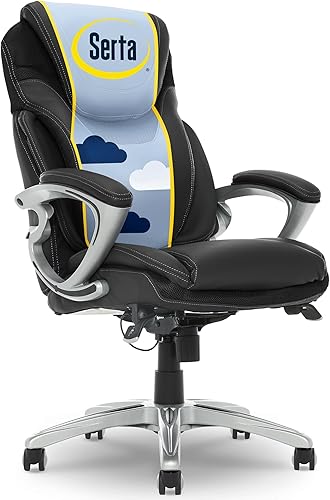
Serta Bryce Executive Chair
- Pivoting AIR lumbar system
- Layered body pillows
- Perforated bonded leather with mesh surrounds
- Adjustable tilt tension
The Bryce suits buyers who prefer padded executive seating and lumbar support designed to pivot with their movements.
Pros
- Pivoting lumbar pad
- Padded headrest and armrests
- Adjustable height and tilt tension
Cons
- Less open back construction than mesh alternatives
- Two people recommended for assembly
MUXX.STIL Ergonomic Chair
- Large adjustable lumbar cushion
- Armrests flip up 90°
- Mesh back
- Waterfall seat edge
Flip-up arms help clear space around a desk, while the padded lumbar cushion suits buyers who prefer a broad contact area.
Pros
- Arms lift out of the way
- Padded lumbar cushion
- Seat height adjusts by 3.74 in
Cons
- Lowest capacity in this group
- Measure desk clearance before choosing
Nexthro Ergonomic Chair with Lumbar
- Two-way lumbar adjustment
- Wide, deep seat
- 3.2 in thick foam cushion
- Mesh back
Choose Nexthro when you need its higher capacity and have enough thigh length to use the deeper seat comfortably.
Pros
- Lumbar height and depth adjust
- Highest capacity in this group
- Roomier seat dimensions
Cons
- Deep seat can prevent shorter users reaching the backrest
- Assembly required
How we chose these office chairs with lumbar support
We compared lumbar controls, seat fit and desk adjustments, with capacity used as a firm buying limit. A chair earns its place by giving a particular buyer useful controls, rather than simply carrying an ergonomic label.
Height adjustment helps place a lumbar pad against your lower back, while depth adjustment changes how far it reaches toward you. Adaptive and pivoting designs offer a different approach by responding to movement.
Seat dimensions can outweigh either feature. If a seat is too deep to let you reach the backrest, even a highly adjustable lumbar pad becomes difficult to use.
The scores reflect those feature and fit differences. A lower-scoring chair can still be the right choice when its shape or capacity matches a need the leading pick does not meet.
| Product | Best for | Lumbar support | Seat | Capacity | Our score |
|---|---|---|---|---|---|
| Marsail Ergonomic Office Chair | fine-tuning desk posture | 1.18 in depth travel; 2.16 in height travel | 3.14 in thick foam cushion | 330 lb | 9.1 |
| TRALT Ergonomic Desk Chair | shallower seat needs | Depth adjustment | 19.7 in wide x 17.3 in deep | 330 lb | 8.9 |
| SIHOO B100 Mesh Chair | frequent posture changes | Adaptive support designed to follow movement | 18.3–21.9 in seat height | 300 lb | 7.9 |
| Marsail 2D Headrest Chair | headrest-focused buyers | 2.4 in vertical adjustment | 3.15 in thick foam cushion | 300 lb | 7.7 |
| Serta Bryce Executive Chair | cushioned executive seating | Pivoting AIR support | Layered foam cushioning | 275 lb | 7.6 |
| MUXX.STIL Ergonomic Chair | shared-room desks | Adjustable sponge-filled cushion | U-shaped high-density foam cushion | 264 lb | 7.4 |
| Nexthro Ergonomic Chair with Lumbar | higher-capacity seating needs | 1 in depth travel; 3.15 in height travel | 20.9 in wide x 20.7 in deep | 400 lb | 7.0 |
Which office chair gives you the most lumbar adjustment?
The first Marsail offers separate height and depth controls, making it the most flexible starting point for buyers who need to fine-tune lumbar contact. Nexthro provides more vertical travel, but its deeper seat changes who it suits.
Marsail Ergonomic Office Chair
- Two-way lumbar adjustment
- Mesh back
- 3D adjustable armrests
- 330 lb capacity
Choose this Marsail when you want separate control over lumbar height and depth, plus flexible arm positioning.
Pros
- Lumbar adjusts vertically and in depth
- Armrests move and flip up
- Adjustable headrest
Cons
- Recline stops at 120°
- Confirm seat-height range for your desk
Marsail's lumbar pad moves 1.18 in forward and backward and 2.16 in up and down. Use the height control to find your lower-back curve, then adjust depth until the pad makes contact without pushing you forward.
Its 3D armrests move forward and backward, swivel and flip up. That matters if you alternate between keyboard work and tasks that need more space beside your body.
A 2D headrest and mesh back round out the design, while the backrest reclines from 90° to 120°. The more upright end suits desk work; the recline gives you another position for brief pauses.
Choose it if fixed lumbar pads tend to land in the wrong place or feel too prominent. Skip it if your main goal is a deeper recline, and confirm the seat-height range if your desk or leg length demands a particular setting.
Which chair lets you change lumbar depth?
The TRALT Ergonomic Desk Chair suits buyers who want to control lumbar pressure and prefer a relatively shallow seat. It is a useful alternative when a deep cushion keeps you from sitting against the backrest.
TRALT Ergonomic Desk Chair
- Depth-adjustable lumbar support
- Molded foam seat
- Mesh back
- 17.7–21.7 in seat height
TRALT suits buyers who want to change lumbar pressure and prefer a shallower seat than the Nexthro.
Pros
- Lumbar depth adjusts
- Seat dimensions help with fit checks
- Flip-up armrests
Cons
- Shorter seat may leave longer thighs unsupported
- Lumbar height adjustment is not specified
TRALT's lumbar mechanism adjusts in depth, so you can change how far the support meets your back. That is most useful when the pad already reaches the right area but feels either too forceful or too distant.
The seat measures 19.7 in wide and 17.3 in deep, with a height range of 17.7–21.7 in. Compare those measurements with a comfortable chair rather than relying on a general height recommendation.
Its molded foam seat pairs with a mesh back. TRALT describes the foam as resilient, but cushion feel remains a personal preference rather than something thickness or material alone can settle.
Choose this chair if you need less seat depth than Nexthro offers. Skip it if you need a confirmed vertical lumbar adjustment or if a shorter seat leaves too much of your thighs unsupported.
After assembly, use our office chair adjustment guide to set seat height before changing lumbar depth.
Which lumbar chair moves with your posture?
The SIHOO B100 Mesh Chair suits buyers who change position often and prefer adaptive support over repeated manual adjustments. SIHOO designs its lumbar mechanism to follow the lower back as you move.
SIHOO B100 Mesh Chair
- Adaptive lumbar support
- Three lockable recline angles
- Flip-up armrests
- Adjustable headrest
Consider the B100 if you move between desk work and reclined breaks and prefer support that responds to movement.
Pros
- Adaptive lumbar design
- Recline locks at three angles
- Mesh back allows airflow
Cons
- Minimum seat height may be too high for shorter legs
- Recline locks begin at 110°
The B100 makes most sense for a workday that includes keyboard tasks, calls and reclined pauses. Its backrest locks at 110°, 125° and 135°, giving you defined leaning positions.
Those locks do not include a 90° position. If you strongly prefer a near-upright backrest, give that difference more weight than the maximum recline angle.
Seat height runs from 18.3–21.9 in. Shorter users should check the lower limit carefully, since unsupported feet can make it harder to stay settled against the backrest.
The mesh back allows airflow, and flip-up armrests clear space beside the seat. An adjustable headrest adds another contact point for leaning back.
Choose it for movement and reclined breaks. Skip it if your priority is dialing in an exact lumbar-pad depth or if the minimum seat height exceeds your comfortable sitting height.
Which chair adds an adjustable headrest?
The Marsail 2D Headrest Chair suits buyers who want separate lumbar-height, headrest and arm-height controls. Choose it when headrest placement matters more than having confirmed lumbar depth adjustment.
Marsail 2D Headrest Chair
- Height-adjustable lumbar pad
- Tilting, height-adjustable headrest
- Height-adjustable armrests
- Mesh back
Separate lumbar-height, headrest and arm-height settings suit buyers who want to adjust support at several points.
Pros
- Lumbar pad moves vertically
- Headrest adjusts in height and tilt
- Armrests adjust in height
Cons
- Lumbar depth adjustment is not specified
- Assembly required
Its lumbar pad moves through a 2.4 in vertical range. That lets you raise or lower the contact area instead of changing your sitting position to meet a fixed pad.
The headrest adjusts 2.8 in in height and tilts 45°. Set it so you can face your screen naturally, rather than allowing it to push your head toward the keyboard.
Height-adjustable armrests help you support your forearms without lifting your shoulders. The mesh back and padded foam seat combine an open back surface with a cushioned sitting surface.
Choose this Marsail if you want those separate settings and prefer a padded seat. Skip it if lumbar pressure is your main problem, since vertical movement alone does not provide the same control as a depth-adjustable pad.
A headrest also has limited value if you rarely lean back. Give seat fit and arm position priority over an extra feature you may barely use.
Which chair has lumbar support that pivots?
The Serta Bryce Executive Chair is the pick for buyers who prefer layered cushioning and an executive-chair shape. Serta designs its AIR lumbar pad to pivot as you lean or twist.
Serta Bryce Executive Chair
- Pivoting AIR lumbar system
- Layered body pillows
- Perforated bonded leather with mesh surrounds
- Adjustable tilt tension
The Bryce suits buyers who prefer padded executive seating and lumbar support designed to pivot with their movements.
Pros
- Pivoting lumbar pad
- Padded headrest and armrests
- Adjustable height and tilt tension
Cons
- Less open back construction than mesh alternatives
- Two people recommended for assembly
The Bryce surrounds that moving support with a contoured backrest and layered body pillows. A padded headrest and armrests add cushioned contact points instead of the more exposed frame and mesh feel of several alternatives.
Its upholstery is bonded leather, with perforations and mesh surrounds. Those openings provide paths for airflow, though buyers who want an open mesh back should compare the other designs.
Adjustable height and tilt tension let you set sitting height and resistance when leaning. The lumbar system's main appeal is its movement, rather than separate manual height and depth controls.
Choose the Bryce if padded executive seating is a firm preference. Skip it if you want precise lumbar positioning, and check its 275 lb capacity before considering comfort features.
Serta recommends 2 people for assembly. Arrange help and enough floor space to align the padded parts without forcing the fasteners.
Which lumbar chair saves space under a desk?
The MUXX.STIL Ergonomic Chair suits a desk in a bedroom, living room or other shared space where raised armrests help clear the walkway. Its arms flip up, but desk clearance still determines how far it can tuck away.
MUXX.STIL Ergonomic Chair
- Large adjustable lumbar cushion
- Armrests flip up 90°
- Mesh back
- Waterfall seat edge
Flip-up arms help clear space around a desk, while the padded lumbar cushion suits buyers who prefer a broad contact area.
Pros
- Arms lift out of the way
- Padded lumbar cushion
- Seat height adjusts by 3.74 in
Cons
- Lowest capacity in this group
- Measure desk clearance before choosing
The large lumbar cushion uses sponge padding within an S-shaped backrest. Consider this design if you prefer a broad padded contact area rather than a small, prominent support point.
Its foam seat has a U-shaped cushion and waterfall edge. A curved front edge can reduce a sharp contact point, but it cannot make an overly deep seat fit shorter legs.
Seat height adjusts through 3.74 in, which describes the amount of travel rather than the lowest sitting position. Check the actual sitting height you need before choosing it for a low desk.
Choose MUXX.STIL when movable arms and padded lumbar contact fit your workspace. Skip it if you exceed its 264 lb capacity, the lowest in this group, or need clearly defined two-way lumbar travel.
Measure under the desk's apron, drawers and crossbars. Raising the arms will not clear an obstruction that catches the seat or backrest.
Which office chair combines two-way lumbar adjustment with higher capacity?
The Nexthro Ergonomic Chair with Lumbar suits buyers who need its 400 lb capacity and can comfortably use a deeper seat. Its adjustable lumbar support is useful only if you can sit fully back.
Nexthro Ergonomic Chair with Lumbar
- Two-way lumbar adjustment
- Wide, deep seat
- 3.2 in thick foam cushion
- Mesh back
Choose Nexthro when you need its higher capacity and have enough thigh length to use the deeper seat comfortably.
Pros
- Lumbar height and depth adjust
- Highest capacity in this group
- Roomier seat dimensions
Cons
- Deep seat can prevent shorter users reaching the backrest
- Assembly required
The pad moves 1 in forward and backward and 3.15 in up and down. That gives you separate controls for contact depth and vertical placement.
Its seat measures 20.9 in wide and 20.7 in deep, with a thick foam cushion. The extra depth is worth considering for longer thighs, but it can leave shorter users perched forward of the lumbar pad.
Choose Nexthro when both capacity and these seat dimensions match your needs. Skip it if reaching the backrest presses the seat edge against your knees.
Capacity does not describe usable width, legroom or how the cushion feels. Compare all three before treating a higher limit as a better fit.
Our guide to office chair weight capacity explains how to use that number alongside fit measurements.
How should you choose an office chair with lumbar support?
Choose seat fit first, lumbar movement second and desk clearance third. This order helps you avoid buying a well-equipped chair whose support you cannot comfortably reach.
Match an office chair with lumbar support to your legs
A suitable seat lets you sit against the backrest with your feet supported and a small gap behind your knees. Measure your current chair while seated, since a foam cushion can compress under your weight.
Use a chair you find comfortable as a reference for depth and height. If your current seat is too deep, note how much shorter it would need to be before shopping.
Width needs similar care. Allow room to change position without choosing such a wide chair that its armrests sit beyond comfortable forearm reach.
Our guide to office chair seat height and seat depth explains these measurements in more detail.
Choose the lumbar control that solves your fit problem
Choose height adjustment when a pad lands too high or low. Choose depth adjustment when the contact area is right but its pressure feels wrong.
Adaptive support is a better starting point if you prefer a mechanism designed to respond as you shift. A pivoting pad serves a similar preference for movement, though the surrounding chair shape still matters.
Do not assume more pressure means more support. A pad that pushes your pelvis away from the backrest can leave you fighting the chair instead of resting against it.
Check the chair against your actual desk
Measure the underside of the desk, including any apron or drawer. Armrests need enough clearance for you to bring the keyboard within easy reach.
If raising the chair makes your elbows fit the desk but leaves your feet hanging, use a stable foot support or reconsider desk height. Lowering the chair until your feet touch can create a different problem if it forces your shoulders upward.
For a screen-based workstation, keep frequently used items close enough that you do not repeatedly leave the backrest to reach them. OSHA's computer workstation chair guidance also covers seat, backrest and armrest fit.
How do you set up lumbar support after assembly?
Set seat height and sitting depth before the lumbar pad, then adjust the arms and headrest. Changing everything at once makes it difficult to identify which setting improves the fit.
- Sit fully back. Place your feet on the floor or a stable support and leave space behind your knees.
- Locate the lower-back curve. Move the lumbar pad toward that area if the chair has a height control.
- Add light contact. Start with less depth, then increase it until the pad meets your back without forcing an exaggerated arch.
- Set the armrests. Let your shoulders relax and bring the arms up to your forearms.
- Check keyboard reach. You should be able to work without leaning forward and abandoning the backrest.
- Adjust recline and headrest. Follow the chair's instructions and keep your head in a comfortable position.
Try the chair during normal tasks, rather than judging it from a brief upright pose. Typing, using a mouse and taking a call may reveal different clearance or reach problems.
Change one setting at a time. If you keep sliding forward, check seat depth and desk reach before adding more lumbar pressure.
What mistakes make lumbar support uncomfortable?
The most common mistake is using lumbar pressure to compensate for poor seat fit. A stronger push cannot solve a seat that keeps your feet unsupported or prevents your knees from clearing the front edge.
Another mistake is setting the pad too high. Lumbar contact belongs around the inward curve of the lower back, rather than across the middle of the rib cage.
Adding a separate lumbar pillow immediately can also complicate fit. It moves you forward on the seat and may turn an otherwise suitable depth into a cramped sitting area.
Avoid holding one rigid pose throughout the day. A chair supports sitting, but changing tasks, standing briefly and moving around still have a place in a comfortable work routine.
Treat recline as another position to use, rather than a reason to stretch toward a distant keyboard. If you lean back for a call or pause, return your work tools to easy reach when you resume typing.
Persistent pain deserves advice from a health professional. Keep chair adjustments focused on comfort and fit rather than expecting a mechanism to treat a health condition.
How do you care for a lumbar-support office chair?
Keep mesh, cushions and moving controls clean, and follow the chair's care instructions for its materials. Gentle, regular cleaning is easier on upholstery than letting debris build up around contact points.
Use a soft brush or suitable vacuum attachment to lift crumbs and dust from mesh and seat seams. Avoid sharp tools that can snag the backrest.
For bonded leather, use only cleaning products allowed by the care instructions. Do not assume that a treatment intended for genuine leather suits a bonded surface.
Inspect accessible fasteners if the chair develops movement or noise, and tighten them only as directed. Keep fingers clear of tilt and lumbar mechanisms while adjusting or inspecting them.
Remove hair and debris from casters so the chair rolls without unnecessary dragging. Do not assume any caster is safe for every floor finish; follow flooring guidance and use suitable protection where needed.
Never open or alter a pressurized gas cylinder. If the chair sinks, rocks unexpectedly or develops a damaged support part, stop using it until the fault is addressed.
What is the best office chair with lumbar support for you?
Pick the Marsail Ergonomic Office Chair if you want to set lumbar height and depth yourself. Choose TRALT when its shallower seat fits your legs better, or SIHOO B100 when movement and reclined breaks matter more than exact pad placement.
Choose the second Marsail for separate headrest and lumbar-height settings, Serta for padded executive seating, or MUXX.STIL for a shared-room desk with arm-clearance needs. Pick Nexthro only when both its higher capacity and deeper seat suit you.
Before ordering an office chair with lumbar support, write down your comfortable seat height, usable seat depth and desk clearance. Those three measurements will narrow the choice more reliably than the word ergonomic.
Once it arrives, follow our guide on how to adjust an office chair to turn the available controls into a workable sitting position.
About this guide: TheSturdiest compared office chairs with lumbar support by lumbar movement, seat fit, capacity and controls relevant to desk work.
Our top 3 picks at a glance
-
1
-
2
-
3
Frequently asked questions
What should you look for in an office chair with lumbar support?
Start with a seat that lets you reach the backrest while keeping your feet supported and space behind your knees. Then choose lumbar adjustment that matches your needs: height for placement, depth for contact pressure, or adaptive support for movement.
Check arm clearance and capacity before deciding.
Is adjustable lumbar support better than adaptive support?
Adjustable lumbar support is better if you want direct control over where the pad sits or how firmly it meets your back. Adaptive support suits buyers who prefer a mechanism designed to follow posture changes.
Neither replaces proper seat fit, and a moving pad can still feel too prominent.
How high should lumbar support sit?
Place lumbar support against the inward curve of your lower back, above your pelvis rather than across your upper back. Start with gentle contact and move it in small steps while sitting back normally.
Our guide to office chair seat height and seat depth explains the seat settings that affect this position.
Can lumbar support fix back pain?
Lumbar support cannot promise to fix back pain, though a well-fitted chair may make sitting more comfortable. Seat fit, desk height, movement and time spent sitting all matter alongside the backrest.
If pain persists or affects daily activity, speak with a health professional rather than relying on a chair change alone.
How do you adjust lumbar support on an office chair?
Set seat height and check seat depth first, then bring the lumbar pad into light contact with your lower back. Adjust one control at a time and reassess with your hands at the keyboard.
Follow the chair's instructions and our guide on how to adjust an office chair.


