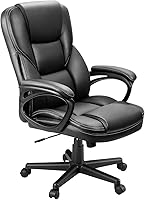
Best Ergonomic Office Chairs for a Home Office
The best ergonomic office chair here is the Marsail Ergonomic Office Chair for its lumbar and arm adjustments. Choose the TRALT for a molded foam seat, the SIHOO M18 for adjustable support within its recommended height range, or the GABRYLLY for a mesh seat and folding arms.
On this page (9 sections)
- What makes the best ergonomic office chair for a home office?
- Which ergonomic office chairs stand out?
- How should you compare lumbar support and armrests?
- Is mesh or foam better for your home office?
- Which measurements matter before you order?
- How do you set up an ergonomic chair at home?
- Which common buying mistakes should you avoid?
- How should you use and care for an office chair?
- How do you make the final ergonomic office chair decision?
The best ergonomic office chair here is the Marsail Ergonomic Office Chair because its lumbar support and movable arms offer several ways to fit your working position. Choose a different model if your seat measurements, material preference or desk clearance point elsewhere.
A useful chair lets you sit back, support your feet and reach the keyboard without stretching. Start with those basics before comparing headrests, recline angles or the number of controls.
TheSturdiest compared these 4 chairs by their dimensions, materials and adjustments. You can also explore our ergonomic mesh office chair guide for related seating advice.
What makes the best ergonomic office chair for a home office?
The best ergonomic office chair fits your body and your workstation together. Its adjustments should help you reach a comfortable position without forcing you to perch on the seat edge or brace yourself against the desk.
An ergonomic label does not describe one standard size. Two people of the same height can need different seat depths because their thigh and lower leg lengths differ.
Your work also matters. Someone who types all day needs easy keyboard access, while someone who spends more time reading may place greater value on back support during a relaxed lean.
Use these checks before deciding which chair has the most appealing extras:
| Check | A useful fit | A reason to reconsider |
|---|---|---|
| Seat height | Feet supported with thighs resting comfortably | Feet dangling or knees pushed too high |
| Seat depth | Back supported with space behind the knees | Sliding forward to escape the front edge |
| Seat width | Room for hips without pressure from the sides | A frame or arms pressing against your body |
| Lumbar support | Gentle contact near the lower back | A hard push that moves you away from the backrest |
| Armrests | Relaxed shoulders and easy desk access | Elbows pushed outward or arms blocking the desk |
| Recline | Supported changes of position | Leaning back while reaching forward to work |
| Workspace | Room to turn, roll and stand | Base or arms catching on furniture |
Reject a poor fit early, even if the chair has more adjustments than another option. A control cannot help if its range never reaches the position you need.
How to choose an ergonomic office chair by fit
Choose an ergonomic office chair by measuring a comfortable sitting position before comparing models. A familiar chair can provide a useful reference, even if you only like its seat height or depth.
Measure from the floor to the top of the seat, then from the back contact area to the front edge. Note what you would change, such as needing a lower seat or more space behind your knees.
Measure the usable width between the arms, rather than relying on the chair's overall width. Also check the opening beneath your desk, including drawers, support rails and any low front apron.
Our office chair seat height and seat depth guide explains those measurements. For the full selection process, read how to choose a home office chair.
Which ergonomic office chairs stand out?
The Marsail leads for adjustment flexibility, followed by the TRALT, SIHOO M18 and GABRYLLY in score order. Each suits a different buying priority, so use the scores alongside your measurements.
| Chair | Score | Best match | Main buying check |
|---|---|---|---|
| Marsail | 9.1 | People who want to fine-tune back and arm position | Confirm seat fit and desk clearance |
| TRALT | 8.9 | People who prefer a molded foam seat | Compare its fixed seat depth with your thighs |
| SIHOO M18 | 8.8 | People within its recommended height range | Confirm the seat measurements you need |
| GABRYLLY | 8.3 | People who want airflow through the seat | Check its seat depth and minimum height |
Marsail Ergonomic Office Chair
Choose the Marsail for adjustable lower back contact and flexible arm placement. It is the strongest starting point here if your current chair puts the lumbar pad or arm pads in the wrong place.
Score: 9.1
Best for desk-based multitaskers
The lumbar support moves 1.18 in forward and back and 2.16 in up and down. Those separate movements let you change both where the support meets your back and how far it reaches.
Its padded arms move forward and back, swivel left and right, and flip up. That combination suits work that shifts between keyboard use, reading and tasks where you want the arms out of the way.
The chair pairs a mesh back with a 3.14 in high-density foam seat. It also has a 2D headrest, a 90°–120° backrest recline and a 330 lb capacity.
The clearest reason to choose it is control over contact points. If you often find arm pads too far forward or lumbar support too low, these movements address those specific fit problems.
Skip the Marsail if you want a mesh sitting surface or need a confirmed seat-depth adjustment. Check usable seat dimensions before ordering, since overall chair measurements do not establish how much thigh support you will get.
Do not choose it solely for the thick cushion. Padding changes the sitting surface, but the front edge and backrest still need to suit your body.
TRALT Ergonomic Desk Chair
Choose the TRALT for its molded foam seat and clear seat measurements. It is a sensible option if you prefer padding under your thighs and want to compare the seat against a chair you already know.
Score: 8.9
Best for padded-seat shoppers
The seat measures 19.7 in wide and 17.3 in deep. TRALT recommends the chair for people about 5 ft 4 in to 6 ft 2 in tall, with a 330 lb capacity.
Its lumbar support adjusts in depth, which helps you change how firmly it meets your lower back. The mesh back provides an open surface behind you, while molded foam forms the sitting surface.
TRALT describes its Class 3 gas cylinder as BIFMA certified. That component claim should remain separate from the fit decision, since it does not tell you where the backrest will contact your body.
Skip the TRALT if you need to move lumbar support vertically and cannot confirm that adjustment. Depth movement changes the support's reach, rather than moving it higher or lower.
Its seat depth is also worth checking closely if you have long thighs. A shorter seat can leave some people wanting more support, while others benefit from the extra room behind their knees.
TRALT promotes the foam's ability to keep its shape, but that promise does not establish its firmness for you. Choose it because the dimensions and seat type match your needs.
SIHOO M18 Ergonomic Chair
Choose the SIHOO M18 if you fall within its recommended height range and want adjustable support at several contact points. It combines a mesh back with a sponge-filled seat and 2D armrests.
Score: 8.8
Best for average-to-tall adults
SIHOO recommends the M18 for people 5 ft 6 in to 6 ft 2 in tall. The chair has adjustments for seat height, headrest, lumbar support and back support, plus tilt lock.
SIHOO states a 150 kg weight capacity and says the chair meets BIFMA requirements. It also backs the chair with a 3-year warranty that includes free replacement parts during that period.
The M18 suits a buyer who wants a conventional padded-seat chair with several ways to position the upper and lower back. Its headrest may be useful during relaxed sitting if it meets your head without pushing it forward.
Skip the M18 if you are below its recommended height range unless you have confirmed the critical measurements. A headrest adjustment cannot compensate for a seat that leaves your feet unsupported.
Also look elsewhere if folding arms are essential to your desk setup. The supplied details identify 2D armrests but do not establish a flip-up function.
Before choosing it for a shared desk, compare the needs of both users. A suitable height range for one person does not show that the seat and headrest will fit the other.
GABRYLLY Ergonomic Office Chair
Choose the GABRYLLY for airflow through both the back and seat, especially if you also want folding arms. Its mesh sitting surface makes it the clearest alternative here to a padded seat.
Score: 8.3
Best for warm home offices
The seat measures 20.5 in wide and 20 in deep, with an 18.9–23.6 in height range. GABRYLLY recommends it for people about 5 ft 2 in to 6 ft 1 in tall and gives it a 300 lb capacity.
The arms adjust in height and fold upward 45°. Its backrest reclines from 90° to 120°, and GABRYLLY backs the chair with a 3-year warranty.
Check leg length carefully, even if your height falls within the brand's recommended range. The minimum seat height and relatively deep sitting area deserve more attention than the broad height recommendation.
Skip this chair if you need a low seat or know that a deep seat presses behind your knees. Moving forward to avoid the edge would reduce contact with the backrest.
It also suits someone who prefers the feel of suspended mesh over foam. If you want a thick padded sitting surface, choose one of the cushioned options instead.
Folding arms help with storage, but measure the desk opening anyway. The remaining chair frame and base still need room to move into place.
How should you compare lumbar support and armrests?
Compare the direction of each adjustment with the problem you need to solve. Extra movement helps only when it places the support where your body needs it.
Match lumbar movement to your lower back
Vertical adjustment moves the support up or down, while depth adjustment changes how far it projects toward you. If a lumbar pad presses at the wrong height, reducing its depth may soften contact without correcting its position.
Start with gentle support rather than the strongest setting. You should be able to sit against the backrest without feeling pushed onto the front of the seat.
A prominent lower back pad is not automatically better than a shallow curve. Some people need less pressure and a different backrest shape.
If support stays uncomfortable after small changes, reconsider the chair's fit. Browse our office chairs with lumbar support for options focused on that adjustment.
Match arm movement to your desk tasks
Armrests should support your forearms without making you lift your shoulders. They also need to let you move close enough to the keyboard that your upper arms can remain near your sides.
Forward and backward movement helps place the pads under your forearms. Swivel movement changes their angle, while height adjustment affects shoulder position.
Flip-up arms solve a different problem: they clear space for desk access or storage. Folding an arm away does not provide support while you type.
For detailed mouse work, check whether you can bring the mouse close without leaning sideways. An arm pad that pushes your elbow outward can work against an otherwise suitable setup.
Is mesh or foam better for your home office?
Choose mesh for an open sitting surface or foam for a padded one, then judge the chair by fit. All 4 chairs have mesh backs, so the bigger material choice here is beneath your thighs.
Mesh stretches across a supporting frame, which makes the shape and edges important. Pay attention to pressure near your thighs and whether you can sit back without contacting a hard edge.
Foam provides cushioning over the seat structure. Thickness alone does not reveal firmness, and adding more padding cannot shorten a seat that is too deep.
Clothing can change how a surface feels during work. Consider what you normally wear at your desk, including thin summer clothing or fabric that catches easily on textured surfaces.
A separate cushion also changes the fit by raising your sitting position. It can reduce useful backrest contact or leave the armrests too low, so avoid planning to correct a mismatched chair with extra padding.
For more on upholstery differences, see mesh vs leather office chairs.
Which measurements matter before you order?
Measure seat fit, desk clearance and floor space before placing an order. Weight capacity and a recommended user height do not replace those measurements.
Check seat width and depth separately
Seat width needs to accommodate your hips without pressure from the arms or side frame. A wider seat is not always more useful if it leaves the arm pads too far apart.
Seat depth should support most of your thighs while leaving space behind your knees. Check this while sitting against the backrest, since measuring from a forward perch hides the mismatch.
If you share the chair, repeat the check for each person. A seat that works for a taller user may leave a shorter user unable to use the backrest.
Measure the desk where you actually sit
Check the underside of the desk as well as the desktop height. Drawers and support rails can block the arms before the chair gets close enough for comfortable typing.
A keyboard tray may change the required armrest position. Measure with it extended, including the space needed for your thighs.
Also leave room behind the chair for standing up. A chair that fits neatly under a desk can still be awkward if a wall prevents you from rolling back.
Treat capacity as a limit, not a size guide
A chair's weight capacity does not describe seat width, backrest height or arm spacing. Stay within the stated limit and check body clearance separately.
If you need more room than these options provide, start with our big and tall office chair buying guide. Choosing a larger chair should still involve matching seat height and depth to your legs.
How do you set up an ergonomic chair at home?
Set up your chair in this order: feet, seat, back support, arms, then headrest and recline. Work at your usual desk so the settings reflect your real keyboard and screen positions.
1. Establish a supported seat height
Set the seat so your feet rest securely on the floor and your thighs feel supported. Avoid lowering it so far that your knees rise sharply above your hips.
If a fixed desk requires a higher seat for comfortable typing, use a stable footrest. Raising the chair and leaving your feet dangling trades one fit problem for another.
2. Check the front edge and back contact
Sit fully back and leave a small gap behind your knees. Your thighs should rest on the seat without the front edge digging into them.
If you must slide forward, check whether the seat is too deep or the lumbar support projects too far. Do not move on to the headrest until you can sit back comfortably.
3. Add gentle lower back support
Place adjustable lumbar support near the natural curve of your lower back. Begin with light contact and increase it only if that feels more comfortable.
Make small changes, then sit normally before changing another control. Adjusting several parts at once makes it harder to identify what helped.
4. Bring the desk tools within reach
Position the keyboard and mouse so your elbows stay near your sides. Set the armrests low enough to keep your shoulders relaxed and high enough to provide useful contact.
If the arms hit the desk, lower or fold them where the chair allows. Recheck your reach after moving them.
5. Set the headrest and recline
Place the headrest so it supports a relaxed position without pushing your head forward. It does not need to contact your head continuously during typing.
Use recline for supported changes of posture, such as reading or taking a call. Avoid leaning far back while reaching forward to a keyboard.
6. Check the whole workstation again
Face your main screen and keep frequently used items close. A chair cannot prevent repeated twisting if your monitor or work materials remain off to one side.
Our guide on how to adjust an office chair walks through the controls in more detail.
Which common buying mistakes should you avoid?
Avoid choosing by feature count, padding thickness or body height alone. Each can distract from whether the chair supports your actual working position.
Choosing a bigger chair for extra comfort
A larger seat can help if you need more width, but extra depth may stop you from reaching the backrest. Bigger dimensions need to solve a specific space problem.
Check the distance between the arm pads too. A roomy seat does little for desk work if you have to spread your elbows to use the arms.
Expecting a headrest to carry your working posture
A headrest is useful when its position matches a relaxed lean. It should not force you to tip your chin or move your shoulders away from the backrest.
If headrest contact feels wrong, adjust it or use the chair without leaning against it. Do not reshape your whole sitting position around that single part.
Confusing recline with active desk support
A reclining back can help you change position, but keyboard work still requires easy reach. The useful angle depends on where your tools sit.
A chair that reclines farther is not automatically better for typing. Choose the movement you can use within your workstation.
Assuming a certification establishes comfort
A certification claim does not establish seat fit or personal comfort. Keep claims about a gas cylinder separate from claims about the complete chair.
Use certifications alongside measurements and adjustment details. They do not remove the need to confirm return terms before ordering.
How should you use and care for an office chair?
Keep the chair clean, correctly assembled and free to move, and change position during the day. Regular care helps you notice loose parts or wear before they interrupt work.
Check assembly before daily use
Follow the chair's instructions and use each fastener in its assigned place. Confirm that arms, backrest and base are secure before reclining or rolling around the desk.
Keep the instructions and spare hardware where you can find them. They are useful if you later need a replacement part or need to identify a control.
Clean mesh and cushions gently
Remove dust and crumbs with a soft brush or suitable vacuum attachment. Use the manufacturer's care instructions before applying a cleaner or wetting upholstery.
Avoid sharp tools on mesh and keep fasteners on clothing from catching the weave. Do not soak a foam cushion, since trapped moisture can be difficult to dry.
Keep wheels and the floor clear
Remove hair and debris from the casters when movement becomes uneven. Clear cables from the chair's path so they cannot wrap around the wheels.
Check floor protection needs for your own surface. A clean caster and a suitable chair mat can matter as much as the wheel material.
Respond to changes in movement
If the chair starts wobbling, check accessible fasteners against the assembly instructions. Stop using it if a structural part cracks or the base becomes unstable.
Contact the brand for suitable replacement parts rather than improvising a repair. Do not open or puncture a pressurized gas cylinder.
Change position during the workday
Alternate focused sitting with short standing or walking breaks when your work allows. Reach for nearby items by turning the chair rather than twisting your back repeatedly.
No chair makes one fixed posture comfortable indefinitely. If pain persists despite sensible adjustments, seek advice from a qualified health professional.
How do you make the final ergonomic office chair decision?
Choose the best ergonomic office chair by eliminating poor fits first, then comparing the adjustments left on your shortlist. That approach gives you a clearer decision than choosing the highest score without checking measurements.
Pick the Marsail if your seat measurements work and you need more control over lumbar contact and arm placement. It is the first option to consider when your current chair's support sits in the wrong place.
Pick the TRALT if you prefer molded foam and its seat dimensions match your legs. Pick the SIHOO M18 if you fit its recommended height range and want its combination of adjustable support and padded seating.
Pick the GABRYLLY if you want a mesh seat and folding arms, provided its depth and minimum height suit you. If any chair leaves your feet unsupported or stops you from sitting back, remove it from consideration.
Before ordering, write down your required seat height, comfortable depth and desk clearance. For more options built around airflow, compare our best mesh office chairs guide.
Frequently asked questions
What makes an office chair ergonomic?
An ergonomic office chair supports a working position that fits your body and desk, with controls that let you change that position. Start with seat height and depth, then check lower back support and arm placement; a headrest or extra recline cannot make up for poor seat fit.
Is mesh or a cushioned seat better for a home office?
Choose mesh if airflow through the sitting surface matters most, or a cushioned seat if you prefer a padded surface. Neither material guarantees comfort: seat depth, edge pressure and the way your weight rests across the seat matter more than choosing by fabric alone.
How do I know if an office chair fits my height?
Use the brand's recommended height range as a starting point, then compare seat height and depth with a chair that already fits you. Your feet should stay supported while you sit against the backrest, with a small gap behind your knees and no need to slide forward.
Do I need adjustable lumbar support?
Choose adjustable lumbar support if you need to change where the lower back support sits or how far it presses forward. Vertical movement changes its position, while depth movement changes its reach; start gently and choose a different back shape if the support keeps pushing you out of position.
What should I check before buying an ergonomic chair?
Check seat dimensions, seat height, weight capacity, arm movement and desk clearance before comparing extras. Measure the space where you'll actually work, confirm return and assembly terms, and make sure you can reach the keyboard without raising your shoulders or giving up contact with the backrest.