Office Chair vs Gaming Chair for Work: Which Is Better? (October 2026)
For office chair vs gaming chair, start with an office chair for keyboard work and choose a gaming chair if reclining breaks matter. Seat fit, back support and desk clearance should decide the final choice.
On this page (10 sections)
- Office chair vs gaming chair: which is better for work?
- Who should choose the TRALT office chair?
- Who should choose the GTPLAYER gaming chair?
- Who should choose the N-GEN gaming chair?
- How do you check seat fit before buying?
- How should you set up either chair for computer work?
- How much room do recline and footrests need?
- Is mesh or PU leather easier to live with?
- What mistakes make either chair uncomfortable?
- Which chair should you choose for your work routine?
Choose an office chair for keyboard work, or a gaming chair if supported lounging is part of your routine. The office chair vs gaming chair decision should start with your body and desk, then move to cushions, upholstery and footrests.
For these 3 options, the TRALT is the first choice for a desk-focused setup. The GTPLAYER suits seated breaks with cushioned supports, while the N-GEN gives you a defined recline range and armrests that follow the backrest.
A gaming chair can be a work chair, and an office chair can serve a gaming desk. The useful distinction is how well each chair supports the positions you actually use.


Office chair vs gaming chair: which is better for work?
An office chair is the better starting point for typing, while a gaming chair makes sense if you'll also use its lounging features. Either choice must let you reach the desk without stretching or perching on the seat edge.
Writing, spreadsheets and mouse work keep your hands near the desk. Prioritize a seat that lets you sit against the backrest while keeping your shoulders relaxed and your feet supported.
Watching videos or using a controller gives you more freedom to lean back. A footrest and reclining backrest become more useful when your hands don't need to stay over a keyboard.
Don't assume every office chair has a full set of ergonomic controls or every gaming chair has the same bucket shape. Compare the actual chair, including seat shape, support position and adjustment limits.
Which office chair vs gaming chair features matter most?
Seat fit comes first, followed by back support and desk access. A headrest or footrest won't help much if the seat edge presses behind your knees.
Use this order to narrow the choice:
- Check seat height, width and depth against a chair that fits you.
- Confirm you can get close to the keyboard without the arms hitting the desk.
- Look for back support you can position comfortably.
- Check floor space for rolling, turning and reclining.
- Choose the extras you'll use during a normal week.
For more desk-focused choices, see the best ergonomic office chairs for a home office. That guide is useful if neither of these gaming chairs matches your working position.
Who should choose the TRALT office chair?
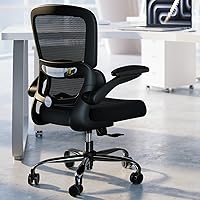
Choose the TRALT for upright desk work if you want a mesh back and lumbar support that adjusts in depth. Skip it if its fixed seat dimensions don't match your legs or you want an attached footrest.
Its seat measures 19.7 in wide and 17.3 in deep, with a 17.7–21.7 in seat height range. These measurements give you a useful fit check before ordering.
Compare seat depth with the space from your back to the bend of your knees while seated. You should be able to use the backrest without the front edge crowding your knees.
The depth adjustment changes how far the lumbar support projects toward your lower back. Start with light contact, then increase it only if the support feels helpful rather than intrusive.
The chair combines a molded foam seat with a mesh back. That combination suits someone who wants a cushioned seat while keeping airflow behind their torso.
TRALT gives it a 330 lb capacity, but capacity doesn't establish body fit. A person within that limit can still need a wider or deeper seat.
TRALT provides conflicting overall dimensions, so confirm its assembled footprint before ordering for a tight space. Measure armrest clearance too, since a chair that stops short of the desk can leave you reaching forward.
Who should choose the GTPLAYER gaming chair?
Choose the GTPLAYER for work and entertainment at one desk if you'll use a footrest and prefer cushioned supports. Skip it if airflow is your main concern or the footrest would stay blocked beneath the desk.
It includes a headrest, lumbar pillow, padded armrests and a retractable footrest. Its metal frame and PU leather upholstery complete a different seating approach from the TRALT's mesh-backed design.
The pillows are useful only when they contact the right places. A head support shouldn't push your chin toward your chest, and lumbar cushioning shouldn't force you away from the backrest.
Before choosing it for daily work, confirm the seat height range, usable seat width and seat depth. Overall chair measurements don't tell you how much sitting space you'll have between the sides.
The padded arms may suit reading or controller use, but check their height against your keyboard surface. Padding can't compensate for arms that make you shrug or prevent you from moving close enough.
GTPLAYER backs the chair with 1-year replacement or repair support. Keep the assembly instructions and order details where you can find them if a part needs attention.
Who should choose the N-GEN gaming chair?
Choose the N-GEN for reclining between tasks if you want armrests that move with the backrest. Skip it if you need separate arm adjustments to fine-tune a demanding keyboard setup.
Its backrest adjusts from 90° to 135°, and its linkage armrests follow that movement. A retractable footrest adds leg support for breaks away from the keyboard.
Linked movement can be useful when you lean back to read or watch something. It doesn't establish that you can change arm height, width or angle separately, so check those needs before committing.
The N-GEN uses high-density foam, PU leather upholstery and a reinforced steel frame with a nylon base. N-GEN provides a 1-year warranty and includes a screw kit and assembly guidance.
Its wing-back shape makes usable space worth checking, especially if you have broad shoulders. Compare the shape around your body rather than treating maximum backrest width as open shoulder room.
For more choices built around seated breaks, see our guide to office chairs with footrests.
How do you check seat fit before buying?
Measure a chair that already fits you, then compare its sitting surface with the chair you're considering. This is more useful than choosing from a broad height recommendation alone.
Start with seat height while wearing your usual indoor footwear. Your feet should have stable support without the seat edge pressing into the underside of your thighs.
Next, sit fully back and check the gap behind your knees. A small gap lets you use the backrest without the front edge pressing into your legs.
Width should allow easy movement without squeezing your hips. If the seat has raised sides, measure the usable flat area rather than relying on its widest outside dimension.
Check the desk next, including any drawer or support bar underneath. You need room for your thighs and enough clearance to move the chair close to your work.
Our guide to office chair seat height and seat depth explains these measurements in more detail. If neither chair style fits, keep looking rather than choosing the one with more accessories.
How should you set up either chair for computer work?
Set up the chair around your feet, keyboard and back, then adjust the screen to suit that position. Don't lean toward a poorly placed laptop and expect the backrest to support you.
Begin with these steps:
- Set the seat height so your feet rest securely on the floor or a stable foot support.
- Sit back and position the lumbar support near the curve of your lower back.
- Bring the keyboard and mouse close enough that your upper arms can stay near your sides.
- Check that the armrests allow relaxed shoulders and easy desk access.
- Place the screen where you can read it without holding your head forward.
If a fixed desk is too high, you may need to raise the seat and add a separate floor footrest. An attached lounging footrest serves a different purpose and may not place your legs well for typing.
Use the headrest when it supports your chosen position, rather than pushing your head back to maintain contact. During focused work, you may not need contact with it at all.
Follow our instructions on how to adjust an office chair for a fuller setup sequence. Recheck your position after changing desks, keyboards or footwear.
How much room do recline and footrests need?
Measure the space the chair uses during movement, including behind the backrest and beyond an extended footrest. Its upright footprint is only part of the space requirement.
Mark the chair area on the floor, then allow room to roll back from the desk. Check nearby drawers, cabinet doors and the path to the room's exit.
A wall directly behind the chair can make reclining impractical. A desk crossbar or storage box can make the footrest awkward to extend even when the chair itself fits.
Think about switching positions too. If every break requires moving a rug, shifting cables or blocking a doorway, those extras may see little use.
Retract the footrest before getting out, and follow the chair's instructions for reclining. Don't stand on the footrest or use it as a step.
Is mesh or PU leather easier to live with?
Choose mesh for airflow and PU leather for a smooth, wipeable surface. Room temperature and care habits matter more here than the office or gaming label.
A mesh back leaves air space behind your torso, which can suit a warm home office. It doesn't determine how warm the seat cushion will feel.
PU leather is useful when you prefer to wipe the contact surfaces after use. GTPLAYER recommends a soft cloth for cleaning its upholstery.
Follow each chair's care instructions before using cleaners. Avoid soaking cushions, scrubbing mesh with stiff brushes or applying harsh products that could damage the surface.
Clear dust and hair from casters so the chair can roll freely. If a joint becomes loose or noisy, check the assembly instructions and inspect the fasteners rather than tightening every bolt as hard as possible.
For a closer material comparison, read mesh vs leather office chairs.
What mistakes make either chair uncomfortable?
Poor fit and a mismatched desk can undermine either chair style. More cushioning or a taller back won't solve those problems.
The first mistake is buying for appearance before checking dimensions. A chair can match the room perfectly while leaving your feet unsupported or your knees crowded.
Another mistake is treating a large lumbar pillow as better support by default. If it pushes you to the front of the seat, change its position or choose a support design that fits you better.
Don't choose deep recline for tasks that still require keyboard reach. Leaning back while stretching your arms toward the desk trades one awkward position for another.
Avoid judging the chair only in one rigid pose. Shift between suitable positions and leave the chair for regular movement breaks during the day.
Finally, separate assembly issues from fit issues. A loose armrest may need correct fastening, while a seat that's too deep needs a different fit solution.
Which chair should you choose for your work routine?
For the office chair vs gaming chair decision, choose the TRALT if your priority is keyboard work and its seat measurements fit. Choose the GTPLAYER for cushioned lounging breaks, or the N-GEN if reclining with moving armrests is the feature you'll use.
Skip both gaming options if their extra space needs would make your room awkward. Skip the TRALT if you need a different seat size, even if its back support appeals to you.
Before ordering, write down your required seat height, usable width, seat depth and desk clearance. Choose the chair that meets those needs first, then use upholstery and break features to settle the remaining choice.
Use our guide to choosing a home office chair to turn those measurements into a final checklist. If your main question is about simpler work seating, office chair vs task chair covers that next comparison.
Sources
Frequently asked questions
Is an office chair or gaming chair better for working?
An office chair is the better starting point for keyboard work when it offers the seat fit and back adjustments you need; a gaming chair can work just as well if it fits your body and desk. Choose by usable adjustments and measurements before considering appearance or extras.
Can you use a gaming chair for an 8-hour workday?
Yes, a gaming chair can serve as your work chair if you can sit back, support your feet and reach the keyboard with relaxed shoulders; check seat depth and armrest clearance before buying. During a long workday, change position and take movement breaks rather than expecting one seated position to suit every task.
Are gaming chairs good for posture?
A gaming chair can support a comfortable position when its seat, backrest and cushions fit you; a thick lumbar pillow can also push you too far forward if it doesn't suit your back. Adjust the support around your natural sitting position, and avoid forcing yourself against cushions that feel misplaced.
Do office chairs have footrests?
Some office chairs include retractable footrests, so you don't need a gaming chair to get that feature; choose an attached footrest for supported lounging between tasks. If your feet don't reach the floor while typing, a separate floor footrest is usually the more useful tool for setting up your workstation.
Is mesh or PU leather better for working?
Mesh is the better starting point if airflow behind your back matters most; PU leather suits buyers who prefer a smooth surface they can wipe clean. Neither material settles seat comfort, so compare cushion shape, seat dimensions and back support before choosing a chair for long periods at a desk.