Office Chair vs Task Chair: Which Is Better? (October 2026)
In an office chair vs task chair comparison, a task chair is one kind of office chair, built for desk work. Choose by seat fit, useful adjustments and desk clearance rather than the name.
On this page (10 sections)
- Office chair vs task chair: what is the difference?
- Who should choose each of these chairs?
- How should you compare chair size and capacity?
- Which materials suit your workspace?
- Which chair makes sense for a long workday?
- Are task chairs a good choice for small desks?
- How should you set up the chair after assembly?
- What care helps an office or task chair last?
- Which buying mistakes should you avoid?
- What is the verdict on office chairs vs task chairs?
A task chair is a type of office chair made for desk work, so office chair vs task chair isn't a choice between 2 separate grades of seating. Buy the model that fits your body, clears your desk and gives you controls you'll use.
An office chair may be designed for a workstation, meeting room or occasional paperwork. A task chair usually centers on desk tasks, but its name doesn't promise adjustable arms, lumbar support or a particular seat size.
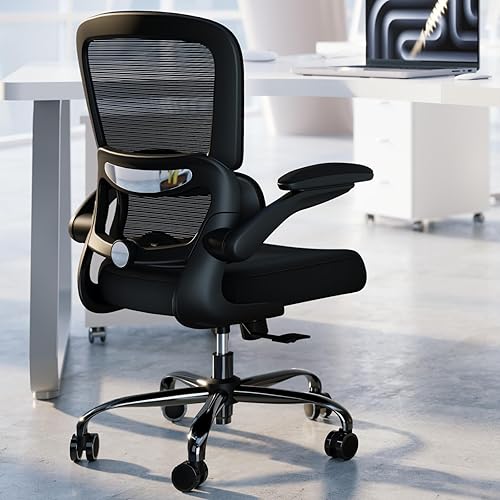
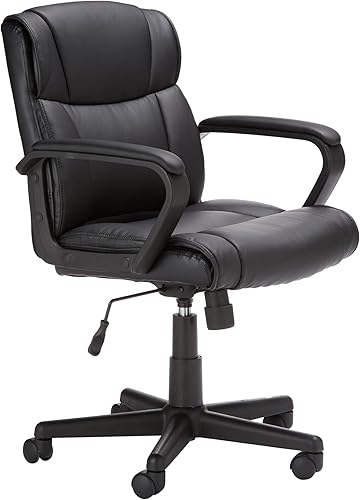
These 3 chairs show the overlap: TRALT favors an armless setup, Amazon Basics offers padded seating, and Staples Dexley provides more ways to adjust your position.
Office chair vs task chair: what is the difference?
The difference is scope, not quality: office chair is the broad category, and task chair describes seating intended for work at a desk. Neither label tells you how well a particular model will fit.
A basic task chair can suit a shared paperwork station, while a more adjustable model can suit a full workday. An office chair with the right dimensions can serve either role too.
Start with your work pattern rather than the label. Someone switching between typing and reading needs different controls from someone who sits briefly to sort mail.
The guide to choosing a home office chair helps turn those habits into a shortlist. Prioritize fit first, then choose the material and extra controls.
Which office chair or task chair adjustments matter most?
Seat height and usable back support come first, followed by arms and tilt that suit your work. A headrest is secondary if you spend most of your time upright at a keyboard.
Seat height affects your relationship with both the floor and desk. Lumbar adjustment should help the backrest meet your lower back without pushing you away from it.
Armrests should let your shoulders relax rather than lift them. Tilt tension controls how readily you lean back, while a tilt lock holds an available recline position.
Don't pay attention only to the number of controls. An adjustment matters when its range lets you reach a comfortable position.
Who should choose each of these chairs?
Choose TRALT for an armless workstation, Amazon Basics for occasional padded seating, or Dexley when you want more control over your daily setup. Each has a clear reason to buy and a reason to look elsewhere.
TRALT: choose it when desk access matters
TRALT suits someone who wants open sides and adjustable lower-back support. Its lumbar mechanism adjusts in depth, letting you change how far the support meets your back.
The mesh back and molded foam seat combine airflow behind you with cushioning beneath you. That pairing suits readers who want a breathable back without choosing a mesh seat.
Skip it if you rely on armrests while reading or pausing between tasks. Your desk may support your forearms while typing, but an armless chair won't provide that support when you turn away.
It also lacks a headrest, so choose another style if head support during reclined breaks is a priority. Don't assume a separate headrest can be added.
Amazon Basics: choose it for a secondary workstation
Amazon Basics suits occasional computer work, paperwork or a spare desk where you prefer padded contact surfaces. Its mid-back design includes padding on the seat, backrest and arms, with height, seat-angle and tilt controls.
The bonded leather upholstery gives it a covered surface rather than exposed mesh. Choose it because you prefer that seat feel, rather than assuming padding alone makes it better for long sessions.
Skip it if adjustable lumbar support or armrest height is central to your setup. Neither adjustment is specified, so the chair needs to fit without depending on them.
Check arm clearance especially carefully at a desk with drawers or a low front apron. If the arms stop you moving close enough, you'll reach forward to work.
Staples Dexley: choose it for more position control
Dexley suits daily desk work when you want to tune arm position, head support and recline. Its controls include lumbar support, armrest height, headrest height and angle, plus tilt tension and a 3-position tilt lock.
Staples specifies it for 5–10 hours of daily use and backs it with a 5-year limited warranty. That makes it relevant to a regular workstation, though body fit still comes first.
Skip it if you strongly prefer a foam cushion or have little space to roll back. Its mesh seat has a different feel, and its full footprint needs room around the desk.
A headrest should meet you during supported leaning back. If it pushes your head forward during upright work, change its position rather than bending your neck to suit it.
How should you compare chair size and capacity?
Compare seat measurements separately from overall dimensions. Seat size affects body fit, while overall size tells you how much workspace the chair occupies.
| Measurement | TRALT | Amazon Basics | Staples Dexley |
|---|---|---|---|
| Seat width | 19.7 in | 20.1 in | 20.1 in |
| Seat depth | 17.3 in | 16.5 in | 18.3 in |
| Seat height | 17.7–21.7 in | Confirm before ordering | 16.6–20.3 in |
| Weight capacity | 330 lb | 275 lb | 275 lb |
A deeper seat isn't automatically better. Sit with your back supported and leave a small gap behind your knees; a seat that reaches the knee crease can make you perch forward.
A shorter seat may suit shorter thighs, but it still needs to support enough of your legs. Measure a chair that already fits reasonably well to get a useful starting point.
Amazon Basics gives an overall chair-height range, which isn't a substitute for seat height. Confirm that measurement if your desk or leg length leaves little room for error.
Dexley measures 28.2 in wide by 28.6 in deep overall. Check that footprint against the space between your desk, wall and nearby storage, including room to stand up.
Capacity is a separate limit from seat fit. Our guide to office chair weight capacity explains why a suitable capacity doesn't guarantee enough seat width or depth.
The office chair seat height and seat depth guide explains how to take the measurements. Use it before choosing a chair based on your height alone.
Which materials suit your workspace?
Choose mesh for airflow and padded upholstery when you prefer a cushioned, covered surface. Check both the seat and back because they affect different parts of your sitting experience.
TRALT combines a mesh back with foam seating, Dexley uses mesh in both areas, and Amazon Basics uses bonded leather upholstery. Those differences matter more than the office or task label.
Full mesh can suit a warm room, but the seat's tension and edge shape still need to feel right. A suspended mesh seat won't feel like a thick cushion.
Covered padding can suit someone who dislikes that suspended feel. In a warm room, consider how much direct contact you'll have with the upholstery during long sessions.
For a closer material comparison, read mesh and leather office chairs. Choose around your room and seat preference rather than appearance alone.
Which chair makes sense for a long workday?
For a long workday, choose a seat that fits without forcing a compromise elsewhere. Enough adjustment to change position is useful, but no chair removes the need to get up and move.
Picture your busiest hour: typing, checking another screen, reading and reaching for notes. Your chair should let you do those tasks without repeated leaning or twisting.
Desk layout matters too. Move frequently used items within easy reach, and position the keyboard so you can keep your elbows near your body.
If you regularly share the chair, easy adjustment becomes more valuable. Each person needs to reset the height and support rather than accept the previous user's position.
Our ergonomic office chair guide offers more options if these chairs don't meet your fit needs. Don't force a choice among 3 models when a key measurement is wrong.
Are task chairs a good choice for small desks?
A task chair works at a small desk when the arms, base and roll-back space all fit. The category name doesn't guarantee a compact footprint.
Measure the opening beneath the desktop, including any drawer or support rail. Then check whether you can pull close enough to use the keyboard without leaning forward.
An armless model removes one possible obstruction, but it still needs floor space. Adjustable arms help only if their available position clears your desk.
Also check the space behind you with nearby drawers open. A chair that fits while tucked away may still block the route you need during work.
Avoid choosing a narrow seat simply to save room. Body fit and room fit both need to work.
How should you set up the chair after assembly?
Set up seat height first, then back support, arms and tilt. Use your normal desk position and everyday footwear so the adjustments match real use.
- Read the assembly instructions. Identify the hardware and controls before sitting down, and tighten fasteners as directed.
- Support your feet. Set the height so your feet rest on the floor; use a footrest if the desk requires a higher seat.
- Check knee clearance. Sit back against the backrest and confirm that the seat edge doesn't press into the backs of your knees.
- Set lower-back support. Adjust it gently until it meets your back without forcing you forward.
- Check your shoulders. Position adjustable arms so they support relaxed forearms without preventing close desk access.
- Set tilt resistance. Start with controlled movement, then choose a lock position that suits the task.
If you lower the chair to support your feet but the keyboard becomes too high, address the desk relationship. Shrugging your shoulders for every keystroke isn't a useful compromise.
Keep the chair close enough to work while leaving room for your legs. Our guide on how to adjust an office chair walks through the setup in more detail.
What care helps an office or task chair last?
Use gentle cleaning and routine checks to protect the seat, moving parts and floor. Follow the chair's care instructions before applying any cleaner.
Remove crumbs and dust from mesh with a soft brush or suitable vacuum attachment. Avoid snagging the weave with sharp tools or grinding debris into it.
Wipe faux leather with a soft cloth and a compatible cleaner. Don't assume a household solvent is safe for the surface, and avoid leaving the upholstery damp.
Clear hair and debris from casters when movement becomes uneven. Check that the wheels suit your floor and use a suitable floor protector where needed.
Recheck accessible fasteners as the instructions allow, especially if a new squeak or looseness appears. Stop using a chair with a cracked support part rather than trying to work around it.
For signs of wear and replacement decisions, see how long office chairs last.
Which buying mistakes should you avoid?
The biggest mistake is buying a label instead of checking fit. A few other shortcuts can leave you with a chair that looks suitable but works poorly at your desk.
- Confusing overall height with seat height. The top of the backrest doesn't tell you where your knees will sit.
- Choosing the deepest seat available. Too much depth can keep shorter users from reaching the backrest.
- Ignoring arm clearance. Padded arms aren't helpful if they keep you away from the keyboard.
- Expecting lumbar support to solve desk problems. Back support can't bring a distant mouse within reach.
- Leaving every control at its starting position. Adjust the chair before deciding whether the fit works.
- Using recline as a typing position. Move back toward the work surface when reaching starts to pull you forward.
If you're also comparing taller, recline-focused styles, our office chair and gaming chair comparison explains that choice. Start with your main work position before considering extras.
What is the verdict on office chairs vs task chairs?
For office chair vs task chair, buy the fit and controls your work requires. Use these choices to narrow the decision, then reject any model that misses a key measurement.
Pick TRALT if open sides and adjustable lumbar depth meet your needs. Choose Amazon Basics for occasional desk work when padded seating and simple controls are enough.
Choose Dexley if you want to fine-tune arm position, head support and recline during regular desk use. Make sure its seat feel and footprint work for you.
Before ordering, write down your required seat height, usable seat depth and desk clearance. The home office chair selection guide helps you finish that check.
TheSturdiest's office chair category guide groups the site's chair comparisons.
Frequently asked questions
Is a task chair the same as an office chair?
A task chair is a type of office chair intended for desk work; office chair is the broader term and also covers conference seating and other work chairs, so either name can appear on a suitable desk chair. Compare dimensions and controls instead of treating the names as separate quality levels.
Which chair is better for sitting all day?
Choose the chair that fits your legs, supports your back and lets you reach your desk without raised shoulders. Staples specifies Dexley for 5–10 hours of daily use, but that doesn't replace a fit check; change position and take regular movement breaks rather than relying on any chair for continuous sitting.
Are task chairs ergonomic?
Some task chairs offer useful ergonomic adjustments, but the name alone doesn't establish fit; look for seat height that works with your desk, a seat depth that leaves knee clearance and back support that meets your lower back. Adjustable arms help only when they let your shoulders stay relaxed.
Should I choose mesh or faux leather?
Choose mesh if airflow is a priority, or faux leather if you prefer a covered, padded surface; check the seat separately from the back because a mesh-back chair can still have a foam cushion. Room temperature, clothing and your preference for a cushioned or suspended seat should guide the choice.
How do I know if a chair fits my desk?
Check seat height, arm clearance and the space needed to roll back before you buy; your feet should have support while your elbows reach the work surface without raised shoulders. The office chair seat height and depth guide explains how to compare seat measurements and clearance beneath your desk.


