Big and Tall Office Chair Buying Guide
Choose a big and tall office chair by seat fit, weight capacity and desk clearance. Match the usable seat dimensions and height range to your body before choosing arm adjustments, upholstery or reclining features.
On this page (10 sections)
- How do you choose a big and tall office chair?
- Which dimensions matter most before you order?
- Which adjustments make desk work easier?
- Should you choose mesh or a padded back?
- Which of these four chairs suits your workday?
- How much space should you leave around the chair?
- How should you set up a new chair?
- How do you care for a heavy-duty office chair?
- What mistakes should you avoid before buying?
- Which big and tall office chair should you choose?
Choose a big and tall office chair that fits your seat measurements and desk, with a weight capacity that covers your needs. A higher capacity cannot make up for a seat that squeezes your hips, presses behind your knees or leaves your feet hanging.
The right choice also depends on how you work. Arm adjustments matter for keyboard use, while a footrest and reclining back matter more if you want a separate position for breaks.
How do you choose a big and tall office chair?
Choose by capacity, usable seat space and seat-height range, in that order. Once those fit, compare the arms, lumbar support and back movement that will help at your desk.
“Big” and “tall” describe different needs. A broad user may need more room between the arms without a higher seat, while a tall user may need greater seat depth and back height without an extra-wide chair.
Start with the chair you use now. Write down where it works and where it fails: squeezed thighs, unsupported legs, low armrests or a backrest that ends in the wrong place.
For measurement details, see our guide to office chair seat height and seat depth. Our home office chair selection guide covers how those measurements work with the rest of your workspace.
How should a big and tall office chair fit?
The seat should support most of your thighs while leaving a small gap behind your knees. Your hips should have room to shift, and your feet should rest steadily on the floor or a separate footrest.
Sit back against the backrest when checking depth. Sliding forward to escape pressure behind your knees can leave the lumbar support too far away to help.
Check width at the narrowest usable point, including the space between the arms. Firm side sections can reduce sitting room even when the outside dimensions look generous.
If a current chair fits well, measure its usable seat as a starting point. Don't copy a measurement from a chair that already causes pressure or forces you into an awkward position.
What weight capacity should you choose?
Choose a stated maximum capacity at or above your needs, and follow the brand's instructions. There is no single extra margin that makes every chair suitable.
GTPLAYER and HYLONE support up to 400 lb, DUMOS up to 500 lb and Indulgear up to 600 lb. Use these limits to rule out unsuitable options before comparing comfort features.
Capacity does not tell you how firm the cushion feels or how long the chair will last. Our office chair weight capacity guide explains the distinction, while our heavy duty office chairs guide offers more options.
Which dimensions matter most before you order?
Check seat-specific measurements first, then use overall dimensions to plan room clearance. Backrest width, base width and total chair width describe different parts.
| Measurement | What you need to know | Buying mistake to avoid |
|---|---|---|
| Usable seat width | Clear room for hips and thighs | Treating total chair width as sitting space |
| Seat depth | Support with a gap behind the knees | Choosing the deepest seat simply because you're tall |
| Seat-height range | Fit with your lower legs and desk | Assuming every adjustable chair lowers enough |
| Backrest shape | Where lumbar support and side sections meet your body | Choosing by back height alone |
| Arm position | Elbow support and clearance beneath the desk | Checking flip-up movement but ignoring working height |
| Base and overall size | Room to roll, turn and get up | Measuring only the opening beneath the desk |
Measure with your usual work shoes on, since they affect your foot position. If you use a seat cushion, account for the height it adds and how it changes the backrest's contact point.
Ask the manufacturer for missing seat dimensions or adjustment ranges before ordering. None of these four chairs should be chosen from its overall dimensions alone.
Which adjustments make desk work easier?
Prioritize seat height, useful arm movement and lumbar position over the number of controls. An adjustment only helps when it reaches the position your body needs.
Match the arms to your keyboard position
Armrests should support your forearms without lifting your shoulders or spreading your elbows too far apart. You should still be able to bring the keyboard and mouse close.
Height adjustment helps with elbow level. Inward movement can matter on a broad chair, while forward and backward movement helps place support beneath your forearms.
Flip-up arms solve a different problem: they move out of the way. That can help with desk clearance, but it doesn't prove the arms fit you while lowered.
Separate lumbar adjustment from recline
Lumbar support should meet the curve of your lower back without pushing you toward the seat edge. Start with gentle contact and increase support only if it improves your position.
Recline changes the angle of the backrest, while rocking moves the chair through a different motion. A chair that rocks may not let you set the back at an independent angle.
If you mainly type upright, prioritize your working position. Choose reclining features for breaks after confirming that the chair fits at the keyboard.
Should you choose mesh or a padded back?
Choose a mesh back for airflow or a padded back for more cushioning around your torso. Neither material makes an incorrectly sized chair fit.
A mesh back can leave more open space for air, but the seat may still be foam-covered. If heat is your main concern, consider both surfaces rather than choosing by the back alone.
Faux leather provides a wipeable surface, though seams and textured areas still need attention. Follow the chair's care instructions rather than assuming every upholstery cleaner is suitable.
For mesh shapes and seat styles, compare our mesh office chair guide and ergonomic mesh office chair guide. Check the frame edges as well as the mesh panel, since firm borders affect where your body can rest.
Cushion thickness is not a firmness scale. A thick cushion can still feel too soft or place you too high relative to the desk.
Which of these four chairs suits your workday?
Choose GTPLAYER for reclining breaks, DUMOS for detailed arm positioning, HYLONE for flip-up access or Indulgear for its higher capacity. Each choice still depends on seat fit.
We compared their dimensions, construction and adjustment features. The order below follows the products in this guide; the best personal fit may appear anywhere in it.
GTPLAYER Big and Tall Chair
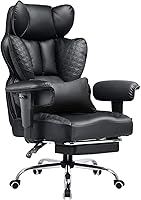
Choose GTPLAYER if you want a padded chair for work and reclining breaks. Its backrest adjusts from 90 to 135 degrees, and it includes a footrest.
The faux-leather chair has a metal frame, vertically adjustable arms and prominent backrest sides. Its seat adjusts from 19.29 to 23.22 in, which makes the lowest setting a key check for anyone with shorter lower legs.
The backrest is 22.05 in wide, and the chair is 31.5 in wide overall. Those figures help describe back coverage and room needs, but neither establishes clear seat width.
Skip this option if you need arms that move inward, pivot or slide forward and back. Also look elsewhere if you prefer an open mesh back or find shaped side sections restrictive.
Before choosing it for breaks, measure space behind the chair and in front of the footrest. The attached footrest serves a different purpose from a separate under-desk foot support used while typing.
DUMOS Big and Tall Chair
Choose DUMOS if arm placement is your main fit problem. Its 4D metal arms move up and down, inward and outward, forward and backward, and pivot.
It combines a mesh back with a 4.33 in sponge cushion and a waterfall front edge. The lumbar support moves forward and backward, while an under-seat knob changes tilt resistance.
Those controls suit a buyer who wants to bring elbow support closer while keeping a broad seat. They also help separate arm position from the position of the keyboard and mouse.
Skip DUMOS if you specifically need flip-up arms to clear your desk. Also confirm the seat-height range and usable seat dimensions before choosing it for an especially tall or short user.
Its overall dimensions are 22 x 26.77 x 42.32 in. Use those for the room-space check, then adjust the arms and lumbar support separately so you can judge each change.
HYLONE 400 lb Big and Tall Chair
Choose HYLONE if arms that move out of the way matter more than fine arm positioning. Its flip-up design suits desks where lowered arms would block a closer sitting position.
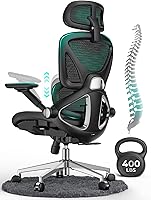
The chair has seat-height and backrest adjustments, plus a 28 in base. HYLONE describes its intended height range as about 5 ft 5 in to 6 ft 2 in and offers 24 months of free parts.
Treat that height range as an initial filter. Two people of equal height can have different leg and torso lengths, so they may need different seat depths or backrest positions.
Skip HYLONE if you need multidirectional arm adjustment or your weight exceeds its limit. If you're outside the suggested height range, confirm the relevant measurements before considering it.
The stated overall size is 21 x 18 x 40 in. The base measurement also matters for floor clearance, so don't plan its parking space from overall width alone.
Indulgear 600 lb Heavy Duty Chair
Choose Indulgear if you need the highest capacity here and prefer a padded executive-style chair. Its inflatable lumbar support lets you change how much the lower-back area projects.
The chair has PU leather upholstery, a pocket spring cushion, flip-back arms and dual rubber casters. Indulgear backs it with a 1-year warranty.
Skip it if you want an independently reclining backrest. It rocks but does not recline, and the back angle cannot be adjusted separately.
Its 32.7 in overall width requires a careful desk and room check. The arms can move away, but that doesn't reduce the space occupied by the rest of the chair.
Start the lumbar air adjustment low, then add small amounts until contact feels comfortable. During assembly, Indulgear specifically instructs users to finish tightening the screws with a wrench after using electric tools.
How much space should you leave around the chair?
Leave enough room to roll back, stand up and turn without hitting furniture. A chair that slides beneath the desk can still be too large for the working area.
Measure the narrowest opening between desk legs or drawer units. Check underside height too, including any apron, cable tray or keyboard shelf.
Allow space behind the chair for your chosen back movement. Footrests need forward clearance, and a wide base may extend beyond the seat or catch nearby furniture.
If you use a floor mat, account for the casters' travel as you sit down and get up. Keep cords outside that path, and check doorways if the assembled chair must move between rooms.
How should you set up a new chair?
Set up feet, seat depth and desk position before fine-tuning support. Changing everything at once makes it harder to identify what improves your posture.
- Place the chair on a level surface and check that assembly is complete.
- Adjust seat height so your feet rest steadily and your thighs aren't pressed upward.
- Sit back and check the gap behind your knees.
- Move close enough to reach the keyboard without leaning forward.
- Set the arms so your shoulders stay relaxed.
- Adjust lumbar contact, then set tilt resistance or back angle.
If desk height forces you to raise the seat beyond comfortable foot contact, a separate footrest may help. It won't correct a seat that's too deep or arms that keep you too far from the keyboard.
Use our office chair adjustment guide for the full setup sequence. Revisit the settings after a normal work session, when pressure points or reaching problems are easier to notice.
Change position during the day and take regular movement breaks. No cushion or support feature makes staying in one position comfortable indefinitely.
How do you care for a heavy-duty office chair?
Follow the brand's cleaning and maintenance instructions, and address loose parts or changes in movement promptly. A capacity label doesn't remove the need for basic care.
Remove grit and hair from around the casters so they can turn freely. Wipe upholstery with an approved method, and keep mesh openings free of dust without soaking padded areas.
Check accessible fasteners at the intervals recommended by the brand. Tighten them as directed rather than applying extra force, which can damage threads or parts.
Avoid dropping into the seat, standing on it or using the arms as lifting handles. Stop using the chair if you find cracks, a loose base connection or unstable movement.
Keep the assembly instructions and warranty details where you can find them. For a practical assembly sequence, see how to assemble an office chair.
What mistakes should you avoid before buying?
Avoid choosing by capacity, cushion thickness or the word “ergonomic” alone. Each describes only part of the chair.
Don't buy a wider chair simply because more space sounds better. Arms that sit too far apart can leave your elbows unsupported or make you spread your shoulders to reach them.
Don't assume added padding fixes poor geometry. A cushion changes your sitting height and where the backrest meets your body, and it can reduce the useful depth of the seat.
Before ordering, confirm these points:
- Your weight falls within the chair's stated limit.
- Usable seat width and depth suit your body.
- The height range works with your legs and desk.
- The arms support your working position or move clear.
- Back movement matches your needs for work and breaks.
- The base and chair fit the room.
- Return terms, assembly requirements and parts support are clear.
For a wider shortlist, compare our best big and tall office chairs. Eliminate poor fits before weighing extras.
Which big and tall office chair should you choose?
Choose your big and tall office chair by the fit problem you need to solve first. Rule out any model that fails on capacity, seat space or working height, regardless of its extras.
Pick GTPLAYER for a padded back and reclining breaks, or DUMOS when precise elbow support matters most. Pick HYLONE for flip-up access, or Indulgear when you need its higher capacity and prefer a padded back.
If two chairs remain, favor the one with confirmed seat measurements and the adjustments you'll use every day. Use our home office chair selection guide to finish checking the desk setup before ordering.
Frequently asked questions
What should I look for in a big and tall office chair?
Look for a weight capacity that covers your needs and a seat that fits your hips and thighs; then check seat height, lumbar position and arm movement against your desk. Overall chair dimensions help with room clearance, but they cannot replace measurements of the usable sitting area.
Is a 400 lb office chair enough?
A 400 lb office chair can suit you if your weight stays within that limit and its dimensions fit your body. A higher capacity does not automatically mean a wider seat or better support; follow the brand's use instructions, and choose a higher capacity if you need it.
Are mesh or upholstered chairs better for big and tall users?
A mesh back suits buyers who want airflow, while a padded upholstered back suits those who prefer more cushioning around the torso. Check the seat separately because a mesh-back chair can still have a thick foam seat; material choice comes after seat fit, capacity and useful adjustments.
How do I know if an office chair seat is wide enough?
Compare the clear sitting space with your seated hip and thigh width, allowing room to shift without pressing against the arms; measure between any firm side edges, too. A chair's overall width includes parts outside the seat, so it cannot tell you how much room your body gets.
Should I choose a chair with adjustable arms?
Choose adjustable arms if you need elbow support while keeping your shoulders relaxed and your keyboard close. Flip-up arms help with desk clearance, but they do not necessarily offer fine height adjustment; check the movement you need rather than choosing by the number of adjustment directions alone.