Sihoo Doro C300 Review: Worth It? (October 2026)
The SIHOO Doro C300 suits people who want lumbar support that follows their movement. Choose a manually adjustable alternative if you prefer to set the support position yourself, and confirm the C300's exact fit measurements before ordering.
On this page (8 sections)
- What does the SIHOO Doro C300 offer?
- Which alternative should you choose over the C300?
- How do you check body fit and desk clearance?
- How should you set up the C300 after assembly?
- How should you use and care for a mesh chair?
- Which buying mistakes matter most?
- What warranty and certification details need checking?
- Should you buy the SIHOO Doro C300?
The SIHOO Doro C300 suits people who want lumbar support that follows their movement during desk work. Its main buying appeal is adaptive support, rather than manual control over a lumbar pad's position.
Choose it if you move between upright work and leaning back, provided the chair fits your body and desk. Choose an alternative below if folding arms, manual lumbar placement or a clearly specified recline range matters more.
What does the SIHOO Doro C300 offer?
The C300 combines adaptive lumbar support, linked 3D armrests and an adjustable 3D headrest with a mesh seat and backrest. These features make it a candidate for people who change position rather than stay in one seated posture.
SIHOO Doro C300 Chair
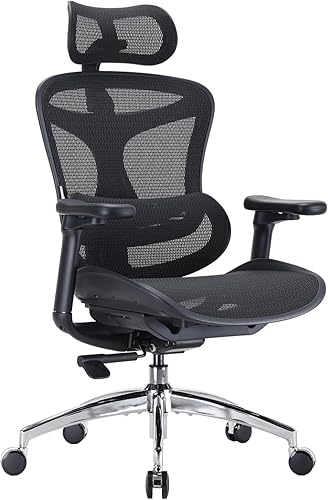
- Adaptive lumbar support
- Linked 3D armrests
- Adjustable 3D headrest
- Mesh seat and backrest
Choose the C300 if you want lower-back support that responds as you lean back. Confirm exact adjustment ranges and fit measurements because some SIHOO specifications also name the A3.
Pros
- Responsive lumbar support
- Adjustable head and arm support
- Mesh seat and backrest
Cons
- Mixed C300 and A3 model references leave exact adjustment ranges unclear
- Less suited to buyers who prefer manual lumbar positioning
The lower-back support responds as you lean back. That is useful if you want support to follow your movement without stopping to reposition a pad.
Adaptive movement still needs to feel right at your lower back. If you prefer a particular support height or a small amount of forward pressure, manual controls give you a more direct way to choose those settings.
The headrest matters most when you lean back for reading or a break. During keyboard work, it should not push your head forward or make you reach toward the screen.
Linked armrests are another feature to assess in relation to your work. Check that your elbows remain supported as you change position and that the pads let you bring the chair close enough to the keyboard.
Who should choose the SIHOO Doro C300?
Choose the C300 for responsive support during posture changes, especially if you dislike adjusting lumbar controls during the day. Its mesh seating also suits buyers who prefer an open seating surface over a padded upholstery feel.
Skip it if exact seat measurements or a specific recline angle are essential and you cannot confirm them. SIHOO mixes C300 and A3 references in some specifications, leaving precise adjustment ranges and certification scope unclear.
That uncertainty is a reason to get the model details settled before ordering. Avoid borrowing measurements from another Doro version just because the chairs look similar.
If you're comparing other chairs from the brand, our SIHOO M18 review gives you another model to consider.
Which alternative should you choose over the C300?
Choose the M57 for manual support and a deeper recline, the GABRYLLY for folding arms, or the MOLENTS for lumbar positioning around desk work. Each solves a different buying need.
| Product | Best for | Lumbar support | Headrest | Armrests | Our score |
|---|---|---|---|---|---|
| SIHOO Doro C300 Chair | frequent posture changes | Automatic, responsive support | 3D adjustment | Linked 3D armrests | 8.3 |
| SIHOO M57 Ergonomic Chair | reclining between tasks | Manual height and depth adjustment | Height and tilt adjustment | 3D armrests | 8.6 |
| GABRYLLY Ergonomic Office Chair | shared desk spaces | Lumbar support | Adjustable headrest | Height adjustable, flip up 45° | 8.3 |
| MOLENTS BIFMA Mesh Chair | precise lumbar placement | Manual height and depth adjustment | Not specified | 3D armrests | 7.4 |
SIHOO M57: choose it for manual control and reclining breaks
The M57 is the strongest alternative here if you want separate lumbar height and depth controls. It lets you set support where you want it rather than rely on automatic movement.
SIHOO M57 Ergonomic Chair
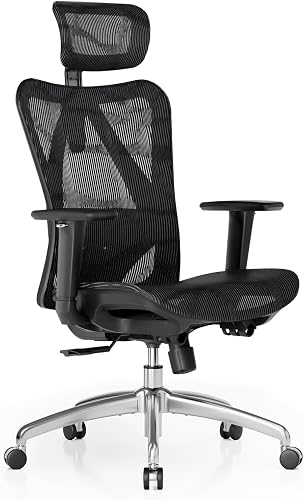
- Height and depth lumbar adjustment
- Tilting and lifting headrest
- 90° to 126° recline
- 3D armrests
The M57 suits people who want to choose their lumbar position and lean farther back between tasks. Its stated weight capacity is 330 lb.
Pros
- Manual control over lumbar placement
- Reclines to 126°
- Headrest lifts and tilts
Cons
- Lumbar position needs manual setup
- Arms are not described as folding away
Its recline runs from 90° to 126°, and the headrest lifts and tilts. That combination makes it worth considering if your workday includes leaning back to read, think or take short breaks.
SIHOO gives it a 330 lb capacity. Treat that as a load limit, then check seat fit and desk clearance separately; a capacity figure does not tell you how much room your hips or thighs will have.
Skip the M57 if your main goal is to avoid manual lumbar setup. Also look elsewhere if folding the arms away is essential for storing the chair.
Our SIHOO M18 vs M57 comparison helps narrow those two models. For a wider brand choice, see SIHOO vs Hbada ergonomic chairs.
GABRYLLY: choose it when the chair must tuck away
The GABRYLLY makes sense for a shared desk or limited floor space, because its arms flip upward. This can help you push the chair closer under a desk after work.
GABRYLLY Ergonomic Office Chair

- Flip-up armrests
- 90° to 120° tilt
- Mesh seat and back
- Recommended height range: about 5 ft 2 in to 6 ft 1 in
Flip-up arms make the GABRYLLY worth considering when the chair needs to tuck under a shared desk. Its seat measures 20.5 in wide and 20 in deep.
Pros
- Arms fold upward for desk clearance
- Published seat measurements help with fit checks
- Mesh seat and back
Cons
- Recommended user height range will not suit everyone
- Seat depth deserves care for shorter thighs
Its seat measures 20.5 in wide and 20 in deep, with a seat-height range of 18.9–23.6 in. The stated capacity is 300 lb, and GABRYLLY recommends it for users about 5 ft 2 in to 6 ft 1 in tall.
Use that height range as a starting point. Two people of the same height can have different thigh lengths, so check that you can sit against the backrest without the seat pressing behind your knees.
The backrest tilts from 90° to 120°. Choose it for desk storage and seated fit rather than the deepest recline in this group.
Skip it if the seat is too deep for your legs or you want the C300's adaptive lumbar approach. Folding arms solve clearance problems, but they do not correct a poor seat fit.
MOLENTS: choose it for deliberate lumbar placement
The MOLENTS suits people who want to move lumbar support up, down, forward and backward. Its 3D armrests also let you change arm-pad position around your keyboard and mouse.
MOLENTS BIFMA Mesh Chair

- Manual lumbar height and depth adjustment
- 3D armrests
- Three recline positions
- 18.9 in seat depth
The MOLENTS suits desk workers who want to place the lumbar support themselves. Check its minimum seat height against your leg length before choosing it.
Pros
- Lumbar support moves vertically and forward or backward
- Arm pads slide and rotate
- Three reclining positions
Cons
- 19.5 in minimum seat height needs a fit check
- Moving arm pads may not suit people who prefer fixed pads
The seat is 19.8 in wide and 18.9 in deep, with a height range of 19.5–23.3 in. Check the minimum height carefully if your feet already struggle to reach the floor in office chairs.
Three backrest positions cover 90° to 120°. That gives you defined positions for upright work and leaning back, rather than making recline depth the main reason to buy.
Skip it if you want arm pads that stay fixed without sliding or rotating. MOLENTS advises contacting its support team about a fixed-panel option, so resolve that preference before choosing.
During assembly, check inside the seat packaging for the base leg. MOLENTS packs those parts together, which can make the base seem missing at first.
How do you check body fit and desk clearance?
Measure your seated fit before comparing feature counts. Seat depth, usable width, foot support and arm clearance decide whether the chair works at your actual desk.
Start with a chair you already use and note what feels wrong. A seat that presses behind your knees calls for a different fit check than armrests that stop you reaching the keyboard.
Check your legs and seat depth
Sit back with your feet supported and leave a small gap behind your knees. You should not need to slide forward and lose back support just to bend your legs comfortably.
Use seat measurements rather than overall chair depth for this check. Our office chair seat height and depth guide explains how those dimensions affect your seated position.
If you need to raise the chair to match a high desk, a footrest may help support your feet. It will not solve a seat that is too deep or too narrow.
Check your shoulders and desk edge
Your shoulders should stay relaxed when your forearms rest near keyboard height. Armrests that lift your shoulders or keep you far from the desk can make a chair's other adjustments less useful.
Measure the underside of the desk, including drawers and support rails. Folding arms help with storage, but you still need a comfortable arm position while working.
For a fuller measurement checklist, use our guide to choosing a home office chair before ordering.
How should you set up the C300 after assembly?
Set seat height and desk position first, then adjust back and arm support. Start with a supported working position before exploring recline.
Follow the supplied assembly sequence and use the specified hardware. Start fasteners as directed, avoid forcing threads and complete the final tightening checks in the manual.
Once assembled, make changes in this order:
- Support your feet. Set the seat so your feet rest on the floor or a suitable footrest.
- Sit fully back. Check that your thighs are supported without pressure behind your knees.
- Position the back support. Use only the controls described for your exact model.
- Set the armrests. Keep your shoulders down and elbows near your body.
- Position the headrest. Aim for support when leaning back without pushing your head forward.
- Check recline last. Learn the lock and resistance controls before putting your weight back.
Change one setting at a time so you can tell what helped. Our guide to adjusting an office chair covers this sequence in more detail.
Move the keyboard and mouse close enough that you do not reach forward from the backrest. A well-adjusted chair cannot compensate for controls placed beyond a comfortable reach.
How should you use and care for a mesh chair?
Keep the mesh clean, protect it from sharp objects and follow the chair's care instructions. Regular attention to the seat, fasteners and wheels helps you spot problems early.
Remove loose dust with a soft brush or a suitable vacuum attachment. Before using a cleaner, check the manual and try an approved method on a hidden area.
Avoid soaking the mesh or spraying cleaner into moving parts. Let damp surfaces dry fully before sitting down.
Keep keys, tools and sharp clothing hardware from catching on the seat. Do not stand on the chair or use an armrest as a step.
Check for loose hardware as directed in the manual, and clear hair or debris from casters. Stop using the chair if you find a cracked part, unstable base or failing height mechanism.
During work, change position and take regular standing or walking breaks. Reclining is another seated position, so use it alongside movement away from the desk.
Which buying mistakes matter most?
The biggest mistake is choosing an adjustment style before checking fit. A moving lumbar system or several armrest controls only help when the chair lets you work comfortably at your desk.
Treating automatic support as a fit guarantee
The C300's responsive lumbar system does not promise that its pressure will suit every person. Choose it because you want that behavior, then assess how the support meets your back.
Buying by capacity alone
A chair can meet your weight requirement and still feel cramped or leave your feet unsupported. Check usable seat width, depth and height as separate requirements.
Choosing recline before keyboard posture
A deep lean is useful for breaks, but most typing happens nearer the desk. Make sure your normal work position feels supported before making maximum recline the deciding feature.
Expecting mesh to feel like thick cushioning
Mesh and padded seats have different sitting feels. If you strongly prefer a soft cushion, consider that preference before choosing any of these mesh-focused options.
Our mesh vs leather office chair guide explains the broader material trade-offs.
What warranty and certification details need checking?
SIHOO states a 3-year warranty, while the C300's exact certification scope needs confirmation. Some safety and mechanism descriptions name the A3, so ask SIHOO which details apply to the C300 you intend to buy.
Check the warranty conditions for your region and keep the order record and assembly instructions. Length of coverage alone does not explain which parts or problems are covered.
Our guide to what BIFMA means for office chairs explains the standard's role. Use certification information alongside fit checks, rather than as a promise of personal comfort.
Should you buy the SIHOO Doro C300?
Buy the SIHOO Doro C300 if responsive lumbar support is your priority and you can confirm that its measurements suit your desk. Skip it when manual support placement or folding arms better solves your daily needs.
Choose the M57 for manual lumbar control and reclining breaks, the GABRYLLY for tucking under a desk, or the MOLENTS for deliberate lumbar placement if its seat height fits you.
Before ordering, write down your required seat fit and desk clearance. If none of these chairs meets those measurements, use our best ergonomic office chairs for a home office guide to widen the shortlist.
Frequently asked questions
Is the SIHOO Doro C300 worth considering?
Yes, the SIHOO Doro C300 is worth considering if you prefer lumbar support that responds to movement instead of setting its position yourself. Its headrest and linked armrests add adjustment options, but fit comes first; confirm the exact model's seat measurements and adjustment ranges before choosing it for your desk.
Does the SIHOO Doro C300 have adjustable lumbar support?
Yes, the C300 has automatically adjusting lumbar support designed to respond as you lean back; this differs from manually choosing a lumbar pad's height and depth. Choose the M57 or MOLENTS if you want direct control over those positions, especially when you already know where you prefer support.
How far does the SIHOO Doro C300 recline?
Confirm the C300's exact recline range with SIHOO before buying, because the numerical tilt details also refer to the A3 model. A deeper angle matters mainly when you want to lean back between tasks; for typing, prioritize supported feet, relaxed shoulders and easy access to your keyboard.
Does the SIHOO Doro C300 need assembly?
Yes, the SIHOO Doro C300 requires assembly using its supplied instructions; check the parts before starting, keep fasteners grouped by step and follow the specified tightening sequence. Our office chair assembly guide explains general preparation, including how to make room and avoid mixing similar hardware.


