Marsail Ergonomic Office Chair Review: Worth It? (October 2026)
The Marsail ergonomic office chair suits desk workers who want flexible arm positioning and adjustable lower-back support. Choose it if you switch between typing and leaning back, provided its seat height and depth fit your body.
On this page (10 sections)
- What makes the Marsail ergonomic office chair worth considering?
- Does the mesh back and padded seat suit your workday?
- Marsail vs SIHOO M18: which buyer suits each?
- Marsail vs TRALT: do you need arms and a headrest?
- Which measurements should you check before buying?
- How should you set up the Marsail for desk work?
- Which adjustment mistakes should you avoid?
- How should you assemble and care for the chair?
- What should you confirm about standards and returns?
- Should you choose the Marsail ergonomic office chair?
The Marsail ergonomic office chair is a good choice for desk workers who change positions and want control over arm and lumbar placement. Its strongest reason to buy is the ability to move those supports around your work posture.
Choose it for typing, mouse work and occasional leaning back, rather than expecting the word “ergonomic” to guarantee a comfortable fit. Seat size and desk height still decide whether those adjustments will work for you.
The SIHOO M18 is worth comparing if you want height guidance from the brand. TRALT suits a different buyer: someone who prefers open sides and no headrest.
What makes the Marsail ergonomic office chair worth considering?
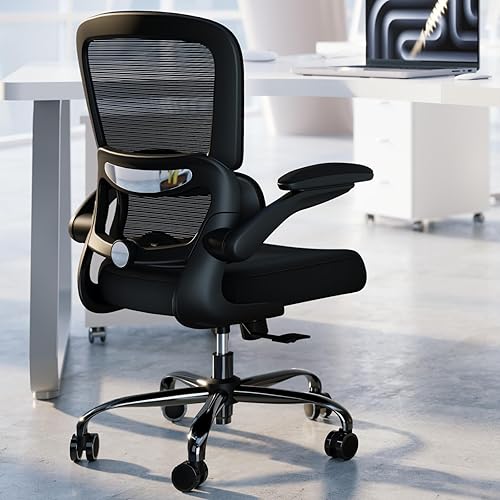
Marsail's main advantage is adjustable contact points for your lower back, forearms and head. That makes it useful when a fixed arm pad or fixed lumbar cushion meets your body in the wrong place.
Marsail Ergonomic Office Chair

- 2D adjustable headrest
- Lumbar moves forward and back, up and down
- Back reclines from 90° to 120°
- 3D adjustable armrests
- 330 lb capacity
Choose Marsail if you want to reposition your arms and lower-back support as you move between desk tasks. Flip-up arms also give you the option to clear the sides of the seat.
Pros
- Lumbar height and depth adjust separately
- Arm pads move forward and back and swivel
- Arms flip up for more side clearance
- Mesh back allows airflow
Cons
- Usable seat dimensions need checking before ordering
- Requires time to adjust several support points
The lumbar support moves 1.18 in forward and back and 2.16 in up and down. You can change both where it touches your back and how strongly it presses against you.
Its PU-padded armrests slide forward and back, swivel left and right, and flip up. Moving the pads can help you support your forearms while keeping your elbows near your sides.
The backrest reclines from 90° to 120°, giving you room to lean back between focused tasks. This is a work-chair recline range, so choose a different design if your main goal is a deep lounging position.
Who should buy the Marsail ergonomic office chair?
Buy the Marsail if armrests often get in your way or lumbar cushions sit too high or low. Its adjustments give you more ways to address those specific fit problems.
It also makes sense for a desk used for different tasks. You might want forearm support while reading, then clear the arms when moving closer for detailed work.
Skip it if you need a known extra-deep seat, unusually low seating or a precise fit for a very short or tall body. Confirm the usable seat dimensions and height range before ordering, because the available measurements don't settle those questions.
Does the mesh back and padded seat suit your workday?
The Marsail suits people who want airflow behind their back and cushioning beneath their thighs. It combines a mesh back with a 3.14 in thick high-density foam seat.
Mesh lets room air reach your back, but it doesn't make the padded seat feel like an all-mesh chair. If you tend to feel warm mainly where your legs meet the cushion, consider that difference.
Foam thickness describes the amount of padding, not its firmness. Focus on whether you prefer a cushioned seat and whether the front edge leaves room behind your knees.
A seat that's too deep can make you slide forward and lose back contact. One that's too shallow can leave more of your thighs unsupported, even if the cushion itself feels soft.
For more options with this back material, compare our mesh office chairs. If lower-back adjustment matters most, start with our guide to office chairs with lumbar support.
Marsail vs SIHOO M18: which buyer suits each?
Choose Marsail for more arm-position options and the SIHOO M18 for a headrest-equipped alternative with a stated user height range. Neither choice should come before checking seat fit.
SIHOO M18 Ergonomic Chair

- Adjustable headrest
- Adjustable lumbar support
- Adjustable seat height
- SIHOO recommends it for people 5 ft 6 in to 6 ft 2 in
The M18 suits buyers who want a headrest and a brand-recommended height range to start their fit checks. Its 2D armrests offer fewer adjustment directions than Marsail's 3D arms.
Pros
- Brand provides a recommended user height range
- Seat height, headrest and lumbar support adjust
- Mesh back allows airflow
Cons
- Height guidance cannot account for different leg and torso lengths
- Armrests offer fewer adjustment directions than Marsail's
SIHOO recommends the M18 for people from 5 ft 6 in to 6 ft 2 in. That's a useful starting filter, especially if you're trying to rule out chairs aimed at a different body size.
Two people of the same height can still have different thigh and torso lengths. Use that guidance to narrow your search, then compare how much seat depth and back height you need.
The M18 offers adjustable seat height, headrest, lumbar support and back support. Its 2D arms are the main tradeoff against Marsail's broader arm movement.
Choose the M18 if those support adjustments cover your needs and you don't need flip-up arms. Skip it if you already know that limited arm-pad positioning keeps you from reaching your keyboard comfortably.
Our SIHOO M18 review explains that alternative in more detail. Compare the adjustments you will actually use, rather than counting every control as an equal benefit.
Marsail vs TRALT: do you need arms and a headrest?
Choose Marsail for supported forearms and an adjustable headrest. Choose TRALT if you deliberately want an armless, headrest-free chair for upright desk work.
TRALT Office Chair with Lumbar
- Depth-adjustable lumbar support
- Mesh back
- 19.7 in seat width
- 17.3 in seat depth
- 17.7–21.7 in seat height
TRALT suits buyers who prefer an armless chair without a headrest and want seat measurements to compare before ordering. Its lumbar depth adjustment lets you change how far the support reaches into your lower back.
Pros
- Lumbar depth adjusts
- Armless design leaves the sides open
- Seat width, depth and height range are specified
Cons
- No headrest for supported leaning back
- No armrests for resting forearms between tasks
TRALT has a 19.7 in wide seat, a 17.3 in seat depth and a 17.7–21.7 in seat height range. Those measurements give you concrete numbers to compare with a chair that already fits.
Its depth-adjustable lumbar support lets you change the amount of contact at your lower back. The mesh back and molded foam seat keep the basic material combination similar to Marsail's.
An armless chair removes the problem of arm pads hitting a desk edge. It also means you need another comfortable way to support your forearms without reaching forward or lifting your shoulders.
TRALT is the better match if you prefer open space beside your hips or rarely use a headrest. Skip it if you rely on armrests during pauses or want head support when leaning back.
Read our TRALT chair review for a closer look at that simpler setup.
Which measurements should you check before buying?
Check seat height, usable depth, width and desk clearance before comparing smaller features. These dimensions determine whether you can sit fully back and still work close to the desk.
Seat height and depth come first
Your feet should rest on the floor or a stable footrest without pressure from the seat edge. If reaching the desk requires raising the chair, make sure your feet still have support.
Sit against your current chair's backrest and note the space behind your knees. A small gap is useful, but you shouldn't need to perch forward to create it.
Measure the seat surface, rather than using the chair's overall depth. Our guide to office chair seat height and seat depth explains how to make those comparisons.
Desk clearance needs more than a width check
Measure between the desk legs and beneath any drawer or support rail. Allow room for your thighs as well as the chair, especially if the desktop has a thick apron underneath.
Flip-up arms can help with storage, but the raised arms and backrest still occupy space. Check the whole chair's path under the desk instead of assuming the seat alone determines clearance.
Leave room behind you for reclining and rolling out. A wall or cabinet immediately behind the chair can make an otherwise useful recline feature difficult to use.
Capacity and fit are separate checks
Marsail's capacity is 330 lb, but that number doesn't describe seat room or back shape. Stay within the limit and check physical fit as a separate step.
If you need a wider seat or a different adjustment range, compare the broader choices in our best ergonomic office chairs for a home office.
How should you set up the Marsail for desk work?
Set seat height first, then lumbar support, arms and headrest. Adjusting in that order keeps you from using one support to compensate for another that's in the wrong place.
- Start at your desk. Wear your usual work shoes, sit fully back and set a height that supports your feet and lets you reach the work surface.
- Place the lumbar support. Move it to the inward curve of your lower back, then add depth gradually until contact feels steady rather than forceful.
- Bring the arms into position. Relax your shoulders and keep your elbows near your sides before sliding and swiveling the pads beneath your forearms.
- Set the headrest last. Use its 2D adjustment to find support when leaning back without pushing your chin toward your chest.
- Check your normal tasks. Type, use the mouse and reach for items you use often, then change any setting that makes you lean away from the backrest.
Keep the keyboard and mouse close enough that you aren't reaching beyond the arm pads. If the desk edge blocks your approach, try clearing the arms and reassess your forearm support.
A slightly reclined posture may work for reading, while closer desk tasks may call for a more upright position. Change settings to suit the task instead of holding one position all day.
For a fuller setup sequence, follow our guide on how to adjust an office chair.
Which adjustment mistakes should you avoid?
Avoid too much lumbar pressure, raised shoulders and a seat set only to match the desk. Those errors can make a chair with many controls feel poorly fitted.
Don't push the lumbar support forward until it forces your back into a deep arch. Start with gentle contact and increase it only if that feels better.
Don't raise the armrests to meet a high desk if doing so lifts your shoulders. Work surface height and foot support may need attention before the arm pads can sit comfortably.
Don't use the headrest to prop your head forward while looking at a low screen. Adjust screen position so you can look ahead without curling your neck down.
Don't change every control at once after a short sitting session. Change one setting, use the chair for a normal task and judge whether that specific change helped.
Even a well-adjusted chair benefits from movement breaks. Stand, walk or change tasks regularly instead of expecting cushioning and lumbar support to make prolonged stillness comfortable.
How should you assemble and care for the chair?
Follow Marsail's included assembly instructions and keep the mesh, cushion and rolling parts free of buildup. Correct assembly and basic cleaning matter more than adding accessories before you understand the fit.
The chair requires assembly and weighs 30.4 lb. Plan how you'll move it to your workspace, especially if stairs are involved.
Lay out the hardware and identify parts before starting. Follow the specified fastening order, and check that the chair sits level and its controls work before settling into regular use.
Vacuum dust and crumbs gently from the seat and mesh. Follow Marsail's care directions for spot cleaning, and avoid soaking the foam or using harsh cleaners on the pads.
Remove hair and debris from the casters when rolling becomes harder. Check fasteners if a new wobble or noise develops, and stop using the chair if you find a damaged structural part.
What should you confirm about standards and returns?
Confirm seat fit, included parts and return terms before ordering. For a chair you can't sit in beforehand, a workable return process matters because measurements can't fully predict cushion feel.
For general background, read what BIFMA means for office chairs. The BIFMA standards overview explains the role of office furniture standards.
A standards reference doesn't establish personal comfort. Follow the chair's assembly instructions and capacity limit, then judge whether its supports meet your body without forcing your posture.
Should you choose the Marsail ergonomic office chair?
Choose the Marsail ergonomic office chair for flexible arm placement and adjustable lumbar contact when your seat-fit checks are satisfied. It's the strongest match here for someone who wants to move between supported desk work and a modest recline.
Choose the SIHOO M18 if its height guidance and simpler arm adjustment suit your needs. Choose TRALT if you want open sides and no headrest, with seat dimensions you can compare directly.
If you still can't identify which support or adjustment you need, read SIHOO vs Hbada ergonomic chairs before deciding. Buy around the fit problem you're trying to solve, then use the chair's controls to refine that fit.
Frequently asked questions
Is the Marsail Ergonomic Office Chair adjustable?
Yes, the Marsail chair lets you adjust its headrest, seat height, lumbar support, backrest and armrests. Set the seat height first, then position the lower-back support and arms around your working posture; adjust the headrest last so it supports your head without pushing it toward the screen.
What is the weight capacity of the Marsail chair?
The Marsail chair has a 330 lb capacity; stay within that limit, but judge physical fit separately: you still need enough usable seat width, a suitable seat depth and a height setting that supports your feet. A capacity figure doesn't establish that a chair fits every body size.
Does the Marsail chair have lumbar support?
Yes, Marsail's lumbar support adjusts both vertically and forward and back. Start with light contact at the inward curve of your lower back, then make small changes while sitting fully back; reduce the depth if the support pushes your hips forward or makes you arch to stay against it.
How does the Marsail chair compare with the SIHOO M18?
Choose Marsail when arm positioning is your main concern, since its 3D arms also flip up; choose the SIHOO M18 if its recommended user height range helps narrow your search. Both have adjustable headrests and lumbar support, so seat fit should decide between them once your adjustment needs are covered.


